Connect to KWDB Using PostgreSQL ODBC
Open Database Connectivity (ODBC) is a standardized application programming interface (API) that enables applications to access data across diverse database management systems. By providing a uniform interface, ODBC facilitates seamless data access and sharing across heterogeneous databases. Applications leveraging the ODBC API can connect to any ODBC-compliant database without requiring code modifications.
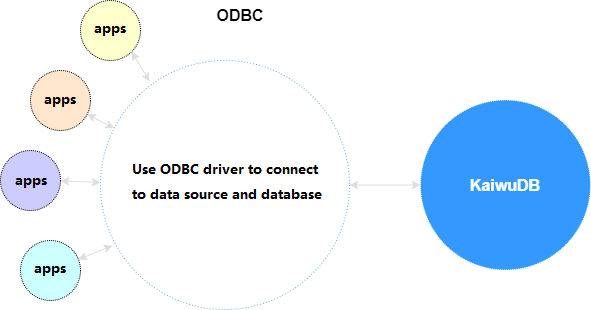
This section explains how to connect to KWDB using the PostgreSQL ODBC interface.
Windows System
Prerequisites
- PostgreSQL ODBC driver installer obtained.
- KWDB installed and running with:
- Properly configured database authentication
- A database created for your connection
- A user with appropriate privileges on tables or higher
Install PostgreSQL ODBC Driver
- Extract the PostgreSQL ODBC driver installation package.
- Run
psqlodbc-setup.exeand follow the installation prompts.
Configure ODBC Data Source
Navigate to Start > Control Panel > System and Security > Administrative Tools to open the Administrative Tools window.
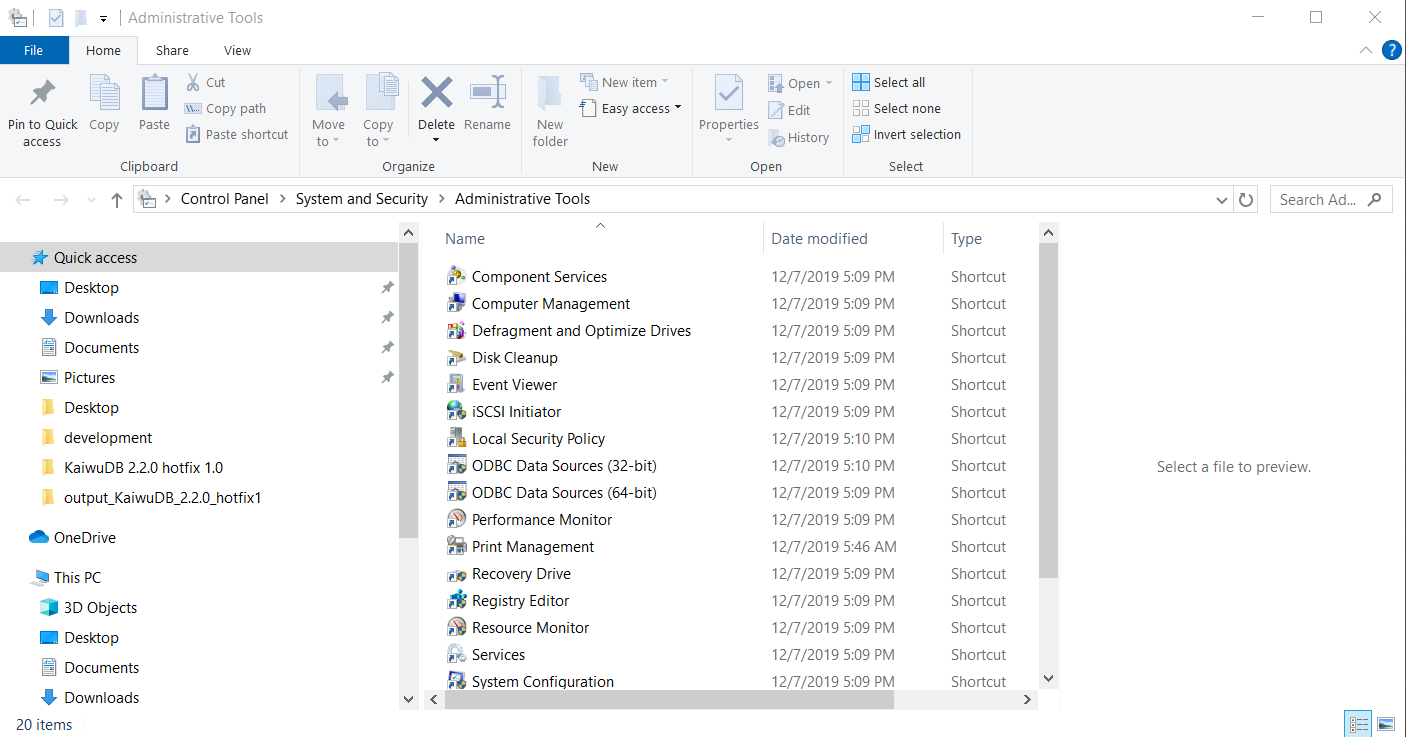
Double-click ODBC Data Sources (64-bit) to launch the ODBC Data Source Administrator.
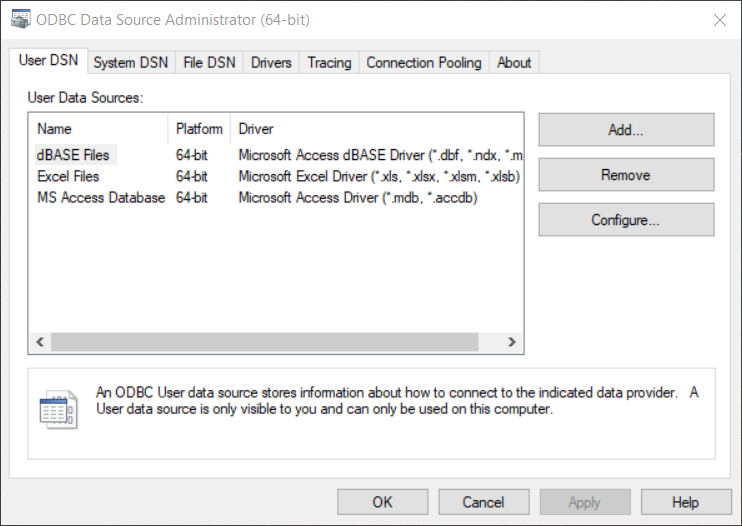
Select the User DSN tab and click Add.
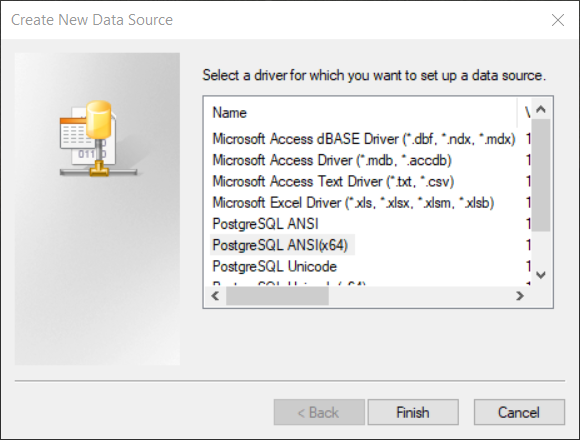
In the Create New Data Source dialog, select PostgreSQL ANSI(x64) and click Finish.
Configure the data source with the following parameters:
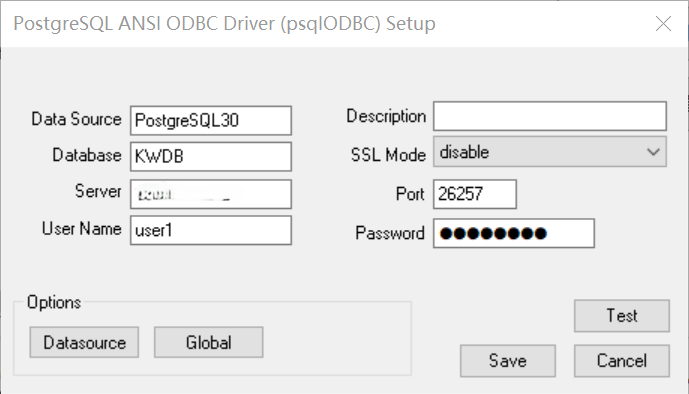
Data Source: Name of the data source.Description: (Optional) description of the data source.Database: Name of the KWDB database.SSL Mode: Whether to enable SSL encryption mode. Disabled by default.Server: IP address of the KWDB database.Port: Connection port of the KWDB database.User Name: Username for connecting to the database.Password: Password used for authentication. In secure mode, SSL certificate-based authentication is recommended.
(Optional) Click Test to verify the configuration. A "Connection successful" message indicates correct configuration.
Click Save to save the configuration.
Click OK to complete the setup.
Connection Example
Relational Database
The following example demonstrates how to connect to a KWDB relational database and query data using a configured data source:
#include <windows.h>
#include <sql.h>
#include <sqlext.h>
#include <stdio.h>

int main() {
    SQLHENV hEnv = NULL;
    SQLHDBC hDbc = NULL;
    SQLHSTMT hStmt = NULL;
    SQLRETURN retcode;
    SQLLEN id;
    SQLCHAR menuID[32];
    SQLCHAR menuName[128];

    // Allocate environment handle
    SQLAllocHandle(SQL_HANDLE_ENV, SQL_NULL_HANDLE, &hEnv);
    // Set environment attributes
    SQLSetEnvAttr(hEnv, SQL_ATTR_ODBC_VERSION, (void*)SQL_OV_ODBC3, 0);
    // Allocate connection handle
    SQLAllocHandle(SQL_HANDLE_DBC, hEnv, &hDbc);
    // Connect to the database
    SQLRETURN ret;
    ret = SQLConnect(hDbc, (SQLCHAR*)"kwdb", SQL_NTS, (SQLCHAR*)"pz", SQL_NTS, (SQLCHAR*)"123", SQL_NTS);
    if (ret != SQL_SUCCESS) {
        printf("Failed to connect the database\n\n");
    }
    else {
        printf("Connected to the database\n\n");
    }


    SQLHSTMT hStmt3 = NULL;
    SQLCHAR* create3 = (SQLCHAR*)"CREATE TABLE b(a varchar); ";
    SQLAllocHandle(SQL_HANDLE_STMT, hDbc, &hStmt3);
    ret = SQLExecDirect(hStmt3, create3, SQL_NTS);
    if (ret != SQL_SUCCESS) {
        printf("execute failed\n");
    }
    else {
        printf("execute success\n");
    }

    SQLHSTMT hStmt4 = NULL;
    SQLCHAR* query4 = (SQLCHAR*)"INSERT INTO b VALUES ('中文读取'); ";
    SQLAllocHandle(SQL_HANDLE_STMT, hDbc, &hStmt4);
    ret = SQLExecDirect(hStmt4, query4, SQL_NTS);
    if (ret != SQL_SUCCESS) {
        printf("execute failed\n");
    }
    else {
        printf("execute success\n");
    }


    SQLHSTMT hStmt9 = NULL;
    SQLCHAR* query9 = (SQLCHAR*)"select * from b;";
    // Allocate statement handle
    SQLAllocHandle(SQL_HANDLE_STMT, hDbc, &hStmt9);
    // Execute query
    ret = SQLExecDirect(hStmt9, query9, SQL_NTS);
    if (ret != SQL_SUCCESS) {
        printf("execute failed\n");
    }
    else {
        printf("execute success\n");
        ret = SQLBindCol(hStmt9, 1, SQL_C_CHAR, &menuID, sizeof(menuID), NULL);

        // Fetch data
        while ((ret = SQLFetch(hStmt9)) == SQL_SUCCESS) {
            printf("a: %s\n", menuID);
        }

        if (ret == SQL_NO_DATA) {
            printf("No more data\n");
        }
        else {
            printf("Failed to fetch data\n");
        }
    }

    // Free handles
    SQLFreeHandle(SQL_HANDLE_STMT, hStmt4);
    SQLFreeHandle(SQL_HANDLE_STMT, hStmt9);

    SQLDisconnect(hDbc);
    SQLFreeHandle(SQL_HANDLE_DBC, hDbc);
    SQLFreeHandle(SQL_HANDLE_ENV, hEnv);

    return 0;
}
Time-series Database
The time-series engine enables short-circuit write functionality by default. PostgreSQL ODBC also supports PREPARE INSERT statements to enhance the performance of time-series data writes.
#include <windows.h>
#include <sql.h>
#include <sqlext.h>
#include <iostream>
#include <vector>
#include <string>
#include <iomanip>
#include <ctime>

// Validate ODBC return codes and throw exceptions on errors
void checkReturn(SQLRETURN ret, SQLHANDLE handle, SQLSMALLINT handleType, const std::string& msg) {
    if (ret != SQL_SUCCESS && ret != SQL_SUCCESS_WITH_INFO) {
        SQLCHAR sqlState[6];
        SQLCHAR message[SQL_MAX_MESSAGE_LENGTH];
        SQLSMALLINT length;
        SQLINTEGER nativeError;

        SQLGetDiagRec(handleType, handle, 1, sqlState, &nativeError, message, sizeof(message), &length);
        std::cerr << "Error: " << msg << "\nSQL State: " << sqlState << "\nMessage: " << message << std::endl;
        throw std::runtime_error(msg);
    }
}

int main() {
    SQLHENV env = nullptr;
    SQLHDBC dbc = nullptr;
    SQLHSTMT stmt = nullptr;

    try {
        // Allocate environment handle
        SQLAllocHandle(SQL_HANDLE_ENV, SQL_NULL_HANDLE, &env);
        SQLSetEnvAttr(env, SQL_ATTR_ODBC_VERSION, (void*)SQL_OV_ODBC3, 0);

        // Allocate connection handle
        SQLAllocHandle(SQL_HANDLE_DBC, env, &dbc);

        // Connect to the data source
        SQLCHAR* dsn = (SQLCHAR*)"kwdb";
        SQLCHAR* user = (SQLCHAR*)"u1";
        SQLCHAR* pass = (SQLCHAR*)"123";

        SQLRETURN ret = SQLConnect(dbc, dsn, SQL_NTS, user, SQL_NTS, pass, SQL_NTS);
        checkReturn(ret, dbc, SQL_HANDLE_DBC, "Failed to connect to data source");

        std::cout << "Connected to data source successfully." << std::endl;

        // Allocate statement handle
        SQLAllocHandle(SQL_HANDLE_STMT, dbc, &stmt);

        // Create database
        const char* createDatabaseSQL =
                "CREATE TS DATABASE tsdb";

        ret = SQLExecDirect(stmt, (SQLCHAR*)createDatabaseSQL, SQL_NTS);
        checkReturn(ret, stmt, SQL_HANDLE_STMT, "Failed to create database");
        std::cout << "Database created successfully." << std::endl;

        // Create table
        const char* createTableSQL =
                "CREATE TABLE tsdb.device_logs ("
                "    ts TIMESTAMP NOT NULL,"
                "    status_code SMALLINT,"
                "    is_online BOOLEAN,"
                "    error_count INTEGER,"
                "    device_name VARCHAR(50))"
                "TAGS ("
                "    device_id INTEGER NOT NULL,"
                "    location VARCHAR(100),"
                "    device_type VARCHAR(30)"
                ") PRIMARY TAGS (device_id)";

        ret = SQLExecDirect(stmt, (SQLCHAR*)createTableSQL, SQL_NTS);
        checkReturn(ret, stmt, SQL_HANDLE_STMT, "Failed to create table");
        std::cout << "Table created successfully." << std::endl;

        // Prepare parameterized insert statement
        const char* insertSQL =
                "INSERT INTO tsdb.device_logs VALUES (?, ?, ?, ?, ?, ?, ?, ?)";

        ret = SQLPrepare(stmt, (SQLCHAR*)insertSQL, SQL_NTS);
        checkReturn(ret, stmt, SQL_HANDLE_STMT, "Failed to prepare insert statement");

        // Define the data structure
        struct DeviceLog {
            SQL_TIMESTAMP_STRUCT ts;
            SQLSMALLINT status_code;
            SQLCHAR is_online;
            SQLINTEGER error_count;
            SQLCHAR device_name[51];
            SQLINTEGER device_id;
            SQLCHAR location[101];
            SQLCHAR device_type[31];
        };

        std::vector<DeviceLog> logs;

        // Create sample records
        DeviceLog log1 = {{2023, 6, 1, 8, 0, 0, 0}, 200, 1, 0, "", 101, "", ""};
        strncpy(reinterpret_cast<char *>(log1.device_name), "Main Server", sizeof(log1.device_name) - 1);
        strncpy(reinterpret_cast<char *>(log1.location), "Server Room", sizeof(log1.location) - 1);
        strncpy(reinterpret_cast<char *>(log1.device_type), "Server", sizeof(log1.device_type) - 1);
        logs.push_back(log1);

        DeviceLog log2 = {{2023, 6, 1, 8, 5, 0, 0}, 200, 1, 0, "", 101, "", ""};
        strncpy(reinterpret_cast<char *>(log2.device_name), "Main Server", sizeof(log2.device_name) - 1);
        strncpy(reinterpret_cast<char *>(log2.location), "Server Room", sizeof(log2.location) - 1);
        strncpy(reinterpret_cast<char *>(log2.device_type), "Server", sizeof(log2.device_type) - 1);
        logs.push_back(log2);

        DeviceLog log3 = {{2023, 6, 1, 8, 0, 0, 0}, 404, 0, 3, "", 201, "", ""};
        strncpy(reinterpret_cast<char *>(log3.device_name), "Sensor Node 1", sizeof(log3.device_name) - 1);
        strncpy(reinterpret_cast<char *>(log3.location), "Hallway", sizeof(log3.location) - 1);
        strncpy(reinterpret_cast<char *>(log3.device_type), "Sensor", sizeof(log3.device_type) - 1);
        logs.push_back(log3);

        DeviceLog log4 = {{2023, 6, 1, 8, 5, 0, 0}, 200, 1, 0, "", 201, "", ""};
        strncpy(reinterpret_cast<char *>(log4.device_name), "Sensor Node 1", sizeof(log4.device_name) - 1);
        strncpy(reinterpret_cast<char *>(log4.location), "Hallway", sizeof(log4.location) - 1);
        strncpy(reinterpret_cast<char *>(log4.device_type), "Sensor", sizeof(log4.device_type) - 1);
        logs.push_back(log4);

        DeviceLog log5 = {{2023, 6, 1, 8, 0, 0, 0}, 500, 0, 5, "", 301, "", ""};
        strncpy(reinterpret_cast<char *>(log5.device_name), "Gateway 1", sizeof(log5.device_name) - 1);
        strncpy(reinterpret_cast<char *>(log5.location), "Entrance", sizeof(log5.location) - 1);
        strncpy(reinterpret_cast<char *>(log5.device_type), "Gateway", sizeof(log5.device_type) - 1);
        logs.push_back(log5);

        // Bind parameters and execute insert
        for (auto& log : logs) {
            SQLBindParameter(stmt, 1, SQL_PARAM_INPUT, SQL_C_TYPE_TIMESTAMP, SQL_TIMESTAMP, 0, 0, &log.ts, 0, nullptr);
            SQLBindParameter(stmt, 2, SQL_PARAM_INPUT, SQL_C_SSHORT, SQL_SMALLINT, 0, 0, &log.status_code, 0, nullptr);
            SQLBindParameter(stmt, 3, SQL_PARAM_INPUT, SQL_C_BIT, SQL_BIT, 0, 0, &log.is_online, 0, nullptr);
            SQLBindParameter(stmt, 4, SQL_PARAM_INPUT, SQL_C_SLONG, SQL_INTEGER, 0, 0, &log.error_count, 0, nullptr);
            SQLBindParameter(stmt, 5, SQL_PARAM_INPUT, SQL_C_CHAR, SQL_VARCHAR, 50, 0, log.device_name, sizeof(log.device_name), nullptr);
            SQLBindParameter(stmt, 6, SQL_PARAM_INPUT, SQL_C_SLONG, SQL_INTEGER, 0, 0, &log.device_id, 0, nullptr);
            SQLBindParameter(stmt, 7, SQL_PARAM_INPUT, SQL_C_CHAR, SQL_VARCHAR, 100, 0, log.location, sizeof(log.location), nullptr);
            SQLBindParameter(stmt, 8, SQL_PARAM_INPUT, SQL_C_CHAR, SQL_VARCHAR, 30, 0, log.device_type, sizeof(log.device_type), nullptr);

            ret = SQLExecute(stmt);
            checkReturn(ret, stmt, SQL_HANDLE_STMT, "Failed to execute insert");

            SQLFreeStmt(stmt, SQL_UNBIND);
        }
        std::cout << "Data inserted successfully." << std::endl;

        //  Prepare query statement
        const char* querySQL = "SELECT * FROM tsdb.device_logs WHERE device_type = ?";
        ret = SQLPrepare(stmt, (SQLCHAR*)querySQL, SQL_NTS);
        checkReturn(ret, stmt, SQL_HANDLE_STMT, "Failed to prepare query statement");

        // Bind query parameter
        SQLCHAR deviceType[] = "Sensor";
        SQLBindParameter(stmt, 1, SQL_PARAM_INPUT, SQL_C_CHAR, SQL_VARCHAR, sizeof(deviceType)-1, 0, deviceType, sizeof(deviceType), nullptr);

        // Execute query
        ret = SQLExecute(stmt);
        checkReturn(ret, stmt, SQL_HANDLE_STMT, "Failed to execute query");

        // Bind result columns
        SQLCHAR ts[64];
        SQLSMALLINT status_code;
        SQLCHAR is_online;
        SQLINTEGER error_count;
        SQLCHAR device_name[51];
        SQLINTEGER device_id;
        SQLCHAR location[101];
        SQLCHAR device_type[31];

        SQLBindCol(stmt, 1, SQL_C_CHAR, &ts, sizeof(ts), nullptr);
        SQLBindCol(stmt, 2, SQL_C_SSHORT, &status_code, 0, nullptr);
        SQLBindCol(stmt, 3, SQL_C_BIT, &is_online, 0, nullptr);
        SQLBindCol(stmt, 4, SQL_C_SLONG, &error_count, 0, nullptr);
        SQLBindCol(stmt, 5, SQL_C_CHAR, device_name, sizeof(device_name), nullptr);
        SQLBindCol(stmt, 6, SQL_C_SLONG, &device_id, 0, nullptr);
        SQLBindCol(stmt, 7, SQL_C_CHAR, location, sizeof(location), nullptr);
        SQLBindCol(stmt, 8, SQL_C_CHAR, device_type, sizeof(device_type), nullptr);

        // Print results
        std::cout << "\nQuery results for device_type = 'Sensor':" << std::endl;
        std::cout << std::left << std::setw(20) << "Timestamp"
                  << std::setw(10) << "Status"
                  << std::setw(8) << "Online"
                  << std::setw(10) << "Errors"
                  << std::setw(15) << "Device Name"
                  << std::setw(8) << "Dev ID"
                  << std::setw(15) << "Location"
                  << std::setw(10) << "Type" << std::endl;

        while (SQLFetch(stmt) == SQL_SUCCESS) {
            std::cout << std::setw(20) << ts
                      << std::setw(10) << status_code
                      << std::setw(8) << (int)is_online
                      << std::setw(10) << error_count
                      << std::setw(15) << device_name
                      << std::setw(8) << device_id
                      << std::setw(15) << location
                      << std::setw(10) << device_type << std::endl;
        }

        std::cout << "\nAll operations completed successfully." << std::endl;
    } catch (const std::exception& e) {
        std::cerr << "Error: " << e.what() << std::endl;
        return 1;
    }

    // Free handles
    if (stmt) SQLFreeHandle(SQL_HANDLE_STMT, stmt);
    if (dbc) {
        SQLDisconnect(dbc);
        SQLFreeHandle(SQL_HANDLE_DBC, dbc);
    }
    if (env) SQLFreeHandle(SQL_HANDLE_ENV, env);

    return 0;
}
Linux System
Prerequisites
- The following software packages installed:
- libgcc (version 9.4.0 or above)
- postgresql-devel (version 10.5 or above)
- unixODBC-devel (version 2.3.7 or above)
- KWDB installed and running with:
- Properly configured database authentication
- A database created for connection
- A user with appropriate table-level or higher privileges
Install Required Packages
libgcc
Contact KWDB Technical Support.
postgresql-devel
yum install postgresql-develunixODBC-devel
yum install unixODBC-devel
Install PostgreSQL ODBC Driver
Download and install the driver:
wget https://update.cs2c.com.cn/NS/V10/V10SP3-2403/os/adv/lic/base/x86_64/Packages/postgresql-odbc-13.00.0000-1.ky10.x86_64.rpm
sudo rpm -ivh postgresql-odbc-13.00.0000-1.ky10.x86_64.rpm
Verify the installation:
Verify if unixODBC is installed:
odbcinst -jVerify if the PostgreSQL ODBC driver is installed:
odbcinst -q -d
You can also examine the
/etc/odbcinst.inifile to confirm installed drivers.
Configure ODBC Data Source
Open the ODBC configuration file (
odbc.ini):vim /etc/odbc.iniAdd your data source configuration:
[kwdb] Description = PostgreSQL Driver = PostgreSQL Trace = No TraceFile = /tmp/pgodbc.log Database = defaultdb Servername = xx.xx.xx.xx UserName = user1 Password = 123456 Port = ppppDescription: (Optional) Description of the data source.Driver: Name of the ODBC driver.Trace: Whether to enable ODBC tracing. Disabled by default.TraceFile: Path to ODBC trace log file.Database: Name of the KWDB database.Servername: IP address of the KWDB database.UserName: Username for database access.Password: Password for authentication.Port: Port for connecting to the KWDB database.
For more configuration options, see the PostgreSQL ODBC documentation.
Verify that unixODBC recognizes your data source:
odbcinst -q -sExpected output:
[kwdb]
Connection Example
Relational Database
The following example demonstrates how to connect to a KWDB database and query data using a configured data source:
Create a demo program file.
The following example creates a demo file named
demo.cpp:vim demo.cppAdd the following code to
demo.cpp:#include <stdio.h> #include <sql.h> #include <sqlext.h> #include <fstream> #include <string> int main() { SQLHENV hEnv = NULL; SQLHDBC hDbc = NULL; SQLHSTMT hStmt = NULL; SQLRETURN retcode; SQLLEN id; SQLCHAR menuID[32]; SQLCHAR menuName[128]; // Allocate environment handle SQLAllocHandle(SQL_HANDLE_ENV, SQL_NULL_HANDLE, &hEnv); // Set environment attributes SQLSetEnvAttr(hEnv, SQL_ATTR_ODBC_VERSION, (void*)SQL_OV_ODBC3, 0); // Allocate connection handle SQLAllocHandle(SQL_HANDLE_DBC, hEnv, &hDbc); // Connect to the database SQLRETURN ret; ret = SQLConnect(hDbc, (SQLCHAR*)"kwdb", SQL_NTS, (SQLCHAR*)"pz", SQL_NTS, (SQLCHAR*)"123", SQL_NTS); if (ret != SQL_SUCCESS) { printf("Failed to connect the database\n\n"); } else { printf("Connected to the database\n\n"); } SQLHSTMT hStmt3 = NULL; SQLCHAR* create3 = (SQLCHAR*)"CREATE TABLE b(a varchar); "; SQLAllocHandle(SQL_HANDLE_STMT, hDbc, &hStmt3); ret = SQLExecDirect(hStmt3, create3, SQL_NTS); if (ret != SQL_SUCCESS) { printf("execute failed\n"); } else { printf("execute success\n"); } SQLHSTMT hStmt4 = NULL; SQLCHAR* query4 = (SQLCHAR*)"INSERT INTO b VALUES ('中文读取'); "; SQLAllocHandle(SQL_HANDLE_STMT, hDbc, &hStmt4); ret = SQLExecDirect(hStmt4, query4, SQL_NTS); if (ret != SQL_SUCCESS) { printf("execute failed\n"); } else { printf("execute success\n"); } SQLHSTMT hStmt9 = NULL; SQLCHAR* query9 = (SQLCHAR*)"select * from b;"; // Allocate statement handle SQLAllocHandle(SQL_HANDLE_STMT, hDbc, &hStmt9); // Execute the query ret = SQLExecDirect(hStmt9, query9, SQL_NTS); if (ret != SQL_SUCCESS) { printf("execute failed\n"); } else { printf("execute success\n"); ret = SQLBindCol(hStmt9, 1, SQL_C_CHAR, &menuID, sizeof(menuID), NULL); // Fetch data while ((ret = SQLFetch(hStmt9)) == SQL_SUCCESS) { printf("a: %s\n", menuID); } if (ret == SQL_NO_DATA) { printf("No more data\n"); } else { printf("Failed to fetch data\n"); } } // Free handles SQLFreeHandle(SQL_HANDLE_STMT, hStmt4); SQLFreeHandle(SQL_HANDLE_STMT, hStmt9); SQLDisconnect(hDbc); SQLFreeHandle(SQL_HANDLE_DBC, hDbc); SQLFreeHandle(SQL_HANDLE_ENV, hEnv); return 0; }Compile the
demo.cppfile using the g++ compiler:g++ demo.cpp -lodbc -o demoThis creates a binary executable named
demo.Execute the program:
./demo
Time-series Database
The time-series engine enables short-circuit write functionality by default. PostgreSQL ODBC also supports PREPARE INSERT statements to enhance the performance of time-series data writes.
The following example demonstrates how to connect to a KWDB database and query data using a configured data source:
Create a demo program file.
The following example creates a demo file named
demo1.cpp:vim demo1.cppAdd the following code to
demo1.cpp:#include <sql.h> #include <sqlext.h> #include <iostream> #include <vector> #include <string> #include <iomanip> #include <ctime> #include <cstring> // Validate ODBC return codes and throw exceptions on errors void checkReturn(SQLRETURN ret, SQLHANDLE handle, SQLSMALLINT handleType, const std::string& msg) { if (ret != SQL_SUCCESS && ret != SQL_SUCCESS_WITH_INFO) { SQLCHAR sqlState[6]; SQLCHAR message[SQL_MAX_MESSAGE_LENGTH]; SQLSMALLINT length; SQLINTEGER nativeError; SQLGetDiagRec(handleType, handle, 1, sqlState, &nativeError, message, sizeof(message), &length); std::cerr << "Error: " << msg << "\nSQL State: " << sqlState << "\nMessage: " << message << std::endl; throw std::runtime_error(msg); } } int main() { SQLHENV env = nullptr; SQLHDBC dbc = nullptr; SQLHSTMT stmt = nullptr; try { // Allocate environment handle SQLAllocHandle(SQL_HANDLE_ENV, SQL_NULL_HANDLE, &env); SQLSetEnvAttr(env, SQL_ATTR_ODBC_VERSION, (void*)SQL_OV_ODBC3, 0); // Allocate connection handle SQLAllocHandle(SQL_HANDLE_DBC, env, &dbc); // Connect to the data source SQLCHAR* dsn = (SQLCHAR*)"kwdb"; SQLCHAR* user = (SQLCHAR*)"u1"; SQLCHAR* pass = (SQLCHAR*)"123"; SQLRETURN ret = SQLConnect(dbc, dsn, SQL_NTS, user, SQL_NTS, pass, SQL_NTS); checkReturn(ret, dbc, SQL_HANDLE_DBC, "Failed to connect to data source"); std::cout << "Connected to data source successfully." << std::endl; // Allocate statement handle SQLAllocHandle(SQL_HANDLE_STMT, dbc, &stmt); // Create database const char* createDatabaseSQL = "CREATE TS DATABASE tsdb"; ret = SQLExecDirect(stmt, (SQLCHAR*)createDatabaseSQL, SQL_NTS); checkReturn(ret, stmt, SQL_HANDLE_STMT, "Failed to create database"); std::cout << "Database created successfully." << std::endl; // Create table const char* createTableSQL = "CREATE TABLE tsdb.device_logs (" " ts TIMESTAMP NOT NULL," " status_code SMALLINT," " is_online BOOLEAN," " error_count INTEGER," " device_name VARCHAR(50))" "TAGS (" " device_id INTEGER NOT NULL," " location VARCHAR(100)," " device_type VARCHAR(30)" ") PRIMARY TAGS (device_id)"; ret = SQLExecDirect(stmt, (SQLCHAR*)createTableSQL, SQL_NTS); checkReturn(ret, stmt, SQL_HANDLE_STMT, "Failed to create table"); std::cout << "Table created successfully." << std::endl; // Prepare parameterized insert statement const char* insertSQL = "INSERT INTO tsdb.device_logs VALUES (?, ?, ?, ?, ?, ?, ?, ?)"; ret = SQLPrepare(stmt, (SQLCHAR*)insertSQL, SQL_NTS); checkReturn(ret, stmt, SQL_HANDLE_STMT, "Failed to prepare insert statement"); // Define the data structure struct DeviceLog { SQL_TIMESTAMP_STRUCT ts; SQLSMALLINT status_code; SQLCHAR is_online; SQLINTEGER error_count; SQLCHAR device_name[51]; SQLINTEGER device_id; SQLCHAR location[101]; SQLCHAR device_type[31]; }; std::vector<DeviceLog> logs; // Create sample records DeviceLog log1 = {{2023, 6, 1, 8, 0, 0, 0}, 200, 1, 0, "", 101, "", ""}; strncpy(reinterpret_cast<char *>(log1.device_name), "Main Server", sizeof(log1.device_name) - 1); strncpy(reinterpret_cast<char *>(log1.location), "Server Room", sizeof(log1.location) - 1); strncpy(reinterpret_cast<char *>(log1.device_type), "Server", sizeof(log1.device_type) - 1); logs.push_back(log1); DeviceLog log2 = {{2023, 6, 1, 8, 5, 0, 0}, 200, 1, 0, "", 101, "", ""}; strncpy(reinterpret_cast<char *>(log2.device_name), "Main Server", sizeof(log2.device_name) - 1); strncpy(reinterpret_cast<char *>(log2.location), "Server Room", sizeof(log2.location) - 1); strncpy(reinterpret_cast<char *>(log2.device_type), "Server", sizeof(log2.device_type) - 1); logs.push_back(log2); DeviceLog log3 = {{2023, 6, 1, 8, 0, 0, 0}, 404, 0, 3, "", 201, "", ""}; strncpy(reinterpret_cast<char *>(log3.device_name), "Sensor Node 1", sizeof(log3.device_name) - 1); strncpy(reinterpret_cast<char *>(log3.location), "Hallway", sizeof(log3.location) - 1); strncpy(reinterpret_cast<char *>(log3.device_type), "Sensor", sizeof(log3.device_type) - 1); logs.push_back(log3); DeviceLog log4 = {{2023, 6, 1, 8, 5, 0, 0}, 200, 1, 0, "", 201, "", ""}; strncpy(reinterpret_cast<char *>(log4.device_name), "Sensor Node 1", sizeof(log4.device_name) - 1); strncpy(reinterpret_cast<char *>(log4.location), "Hallway", sizeof(log4.location) - 1); strncpy(reinterpret_cast<char *>(log4.device_type), "Sensor", sizeof(log4.device_type) - 1); logs.push_back(log4); DeviceLog log5 = {{2023, 6, 1, 8, 0, 0, 0}, 500, 0, 5, "", 301, "", ""}; strncpy(reinterpret_cast<char *>(log5.device_name), "Gateway 1", sizeof(log5.device_name) - 1); strncpy(reinterpret_cast<char *>(log5.location), "Entrance", sizeof(log5.location) - 1); strncpy(reinterpret_cast<char *>(log5.device_type), "Gateway", sizeof(log5.device_type) - 1); logs.push_back(log5); // Bind parameters and execute insert for (auto& log : logs) { SQLBindParameter(stmt, 1, SQL_PARAM_INPUT, SQL_C_TYPE_TIMESTAMP, SQL_TIMESTAMP, 0, 0, &log.ts, 0, nullptr); SQLBindParameter(stmt, 2, SQL_PARAM_INPUT, SQL_C_SSHORT, SQL_SMALLINT, 0, 0, &log.status_code, 0, nullptr); SQLBindParameter(stmt, 3, SQL_PARAM_INPUT, SQL_C_BIT, SQL_BIT, 0, 0, &log.is_online, 0, nullptr); SQLBindParameter(stmt, 4, SQL_PARAM_INPUT, SQL_C_SLONG, SQL_INTEGER, 0, 0, &log.error_count, 0, nullptr); SQLBindParameter(stmt, 5, SQL_PARAM_INPUT, SQL_C_CHAR, SQL_VARCHAR, 50, 0, log.device_name, sizeof(log.device_name), nullptr); SQLBindParameter(stmt, 6, SQL_PARAM_INPUT, SQL_C_SLONG, SQL_INTEGER, 0, 0, &log.device_id, 0, nullptr); SQLBindParameter(stmt, 7, SQL_PARAM_INPUT, SQL_C_CHAR, SQL_VARCHAR, 100, 0, log.location, sizeof(log.location), nullptr); SQLBindParameter(stmt, 8, SQL_PARAM_INPUT, SQL_C_CHAR, SQL_VARCHAR, 30, 0, log.device_type, sizeof(log.device_type), nullptr); ret = SQLExecute(stmt); checkReturn(ret, stmt, SQL_HANDLE_STMT, "Failed to execute insert"); SQLFreeStmt(stmt, SQL_UNBIND); } std::cout << "Data inserted successfully." << std::endl; // Prepare query statement const char* querySQL = "SELECT * FROM tsdb.device_logs WHERE device_type = ?"; ret = SQLPrepare(stmt, (SQLCHAR*)querySQL, SQL_NTS); checkReturn(ret, stmt, SQL_HANDLE_STMT, "Failed to prepare query statement"); // Bind query parameter SQLCHAR deviceType[] = "Sensor"; SQLBindParameter(stmt, 1, SQL_PARAM_INPUT, SQL_C_CHAR, SQL_VARCHAR, sizeof(deviceType)-1, 0, deviceType, sizeof(deviceType), nullptr); // Execute query ret = SQLExecute(stmt); checkReturn(ret, stmt, SQL_HANDLE_STMT, "Failed to execute query"); // Bind result columns SQLCHAR ts[64]; SQLSMALLINT status_code; SQLCHAR is_online; SQLINTEGER error_count; SQLCHAR device_name[51]; SQLINTEGER device_id; SQLCHAR location[101]; SQLCHAR device_type[31]; SQLBindCol(stmt, 1, SQL_C_CHAR, &ts, sizeof(ts), nullptr); SQLBindCol(stmt, 2, SQL_C_SSHORT, &status_code, 0, nullptr); SQLBindCol(stmt, 3, SQL_C_BIT, &is_online, 0, nullptr); SQLBindCol(stmt, 4, SQL_C_SLONG, &error_count, 0, nullptr); SQLBindCol(stmt, 5, SQL_C_CHAR, device_name, sizeof(device_name), nullptr); SQLBindCol(stmt, 6, SQL_C_SLONG, &device_id, 0, nullptr); SQLBindCol(stmt, 7, SQL_C_CHAR, location, sizeof(location), nullptr); SQLBindCol(stmt, 8, SQL_C_CHAR, device_type, sizeof(device_type), nullptr); // Print results std::cout << "\nQuery results for device_type = 'Sensor':" << std::endl; std::cout << std::left << std::setw(20) << "Timestamp" << std::setw(10) << "Status" << std::setw(8) << "Online" << std::setw(10) << "Errors" << std::setw(15) << "Device Name" << std::setw(8) << "Dev ID" << std::setw(15) << "Location" << std::setw(10) << "Type" << std::endl; while (SQLFetch(stmt) == SQL_SUCCESS) { std::cout << std::setw(20) << ts << std::setw(10) << status_code << std::setw(8) << (int)is_online << std::setw(10) << error_count << std::setw(15) << device_name << std::setw(8) << device_id << std::setw(15) << location << std::setw(10) << device_type << std::endl; } std::cout << "\nAll operations completed successfully." << std::endl; } catch (const std::exception& e) { std::cerr << "Error: " << e.what() << std::endl; return 1; } // Free handles if (stmt) SQLFreeHandle(SQL_HANDLE_STMT, stmt); if (dbc) { SQLDisconnect(dbc); SQLFreeHandle(SQL_HANDLE_DBC, dbc); } if (env) SQLFreeHandle(SQL_HANDLE_ENV, env); return 0; }Compile the
demo1.cppfile using the g++ compiler:g++ demo.cpp -lodbc -o demo1This creates a binary executable named
demo1.Execute the program:
./demo1
Supported ODBC Interfaces
KWDB supports the following ODBC interfaces:
| Interface | Conformance Level | Description |
|---|---|---|
SQLAllocHandle | Core | Allocates environment, connection, statement, or descriptor handles. |
SQLBindCol | Core | Allocates storage for result columns and specifies data types. |
SQLBindParameter | Core | Allocates storage for parameters in SQL statements. Note: The ODBC driver does not support multi-row parameter binding during the prepare operation. Using multi-row binding may cause data type conversion errors; row-by-row binding is recommended. |
SQLCloseCursor | Core | Closes a cursor previously opened on a statement handle. |
SQLColAttribute | Core | Describes the attributes of columns in a result set. |
SQLColumns | Core | Returns a list of column names in a specified table. |
SQLConnect | Core | Connects to a specific driver using data source name, user ID, and password. |
SQLDataSources | Core | Returns a list of available data sources. |
SQLDescribeCol | Core | Describes columns in a result set. |
SQLDisconnect | Core | Closes the connection. |
SQLDriverConnect | Core | Connects to a specific driver using a connection string or by prompting the user via connection dialog boxes. |
SQLDrivers | Core | Returns a list of installed drivers and their attributes. |
SQLExecDirect | Core | Executes a statement. |
SQLExecute | Core | Executes a prepared statement. |
SQLFetch | Core | Retrieves multiple rows of result data. |
SQLFreeHandle | Core | Frees environment, connection, statement, or descriptor handles. |
SQLFreeStmt | Core | Ends statement processing, discards pending results, and optionally frees all resources associated with the statement handle. |
SQLGetConnectAttr | Core | Returns the value of a connection attribute. |
SQLGetCursorName | Core | Returns the name of the cursor associated with a statement handle. |
SQLGetData | Core | Retrieves all or part of a column's data from the current row of a result set, typically used to fetch large data values. |
SQLGetDiagField | Core | Returns diagnostic information (a single field of the diagnostic data structure). |
SQLGetDiagRec | Core | Returns diagnostic information (multiple fields of the diagnostic data structure). |
SQLGetEnvAttr | Core | Returns the value of an environment attribute. |
SQLGetFunctions | Core | Returns the supported driver functions. |
SQLGetInfo | Core | Returns information about a specific driver and data source. |
SQLGetStmtAttr | Core | Returns the value of a statement attribute. |
SQLGetTypeInfo | Core | Returns information about supported data types. |
SQLNativeSql | Core | Returns the SQL text translated by the driver. |
SQLNumParams | Core | Returns the number of parameters in an SQL statement. |
SQLNumResultCols | Core | Returns the number of columns in a result set. |
SQLParamData | Core | Used with SQLPutData to supply parameter data at execution time, typically for large or long data values. |
SQLPrepare | Core | Prepares an SQL statement for later execution. |
SQLPutData | Core | Sends part or all of a parameter’s data value, typically for large or long data values. |
SQLRowCount | Core | Returns the number of rows affected by an insert, update, or delete operation. |
SQLSetConnectAttr | Core | Sets connection attributes. |
SQLSetCursorName | Core | Specifies a cursor name. |
SQLSetDescField | Core | Sets a single descriptor field. |
SQLSetEnvAttr | Core | Sets environment attributes. |
SQLSetStmtAttr | Core | Sets statement attributes, including resetting all to default values or setting specific ones. |
SQLStatistics | Core | Returns statistics about a single table and its associated indexes. |
SQLTables | Core | Returns a list of table names stored in a specific data source. |
SQLMoreResults | Level 1 | Determines whether more result sets are available and initializes processing of the next set. |
SQLProcedures | Level 1 | Returns a name list of procedures stored in a specific data source. |
SQLSetPos | Level 1 | Positions the cursor within a block of fetched data and allows applications to refresh, update, or delete rows in the result set. |
SQLDescribeParam | Level 2 | Returns descriptive information for a specific parameter in a statement. |