Relational Tables
CREATE TABLE
The CREATE TABLE statement creates a new table in a database.
Privileges
The user must be a member of the admin role or have been granted the CREATE privilege on the specified database(s). By default, the root user belongs to the admin role.
Syntax
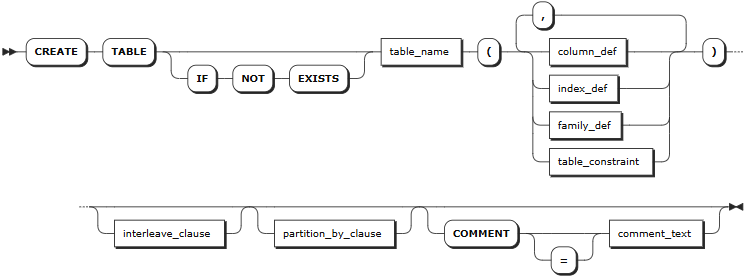
column_def
col_qualification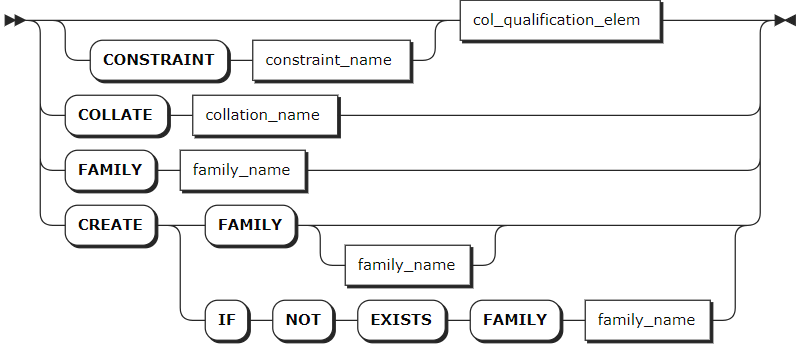
col_quailfication_elem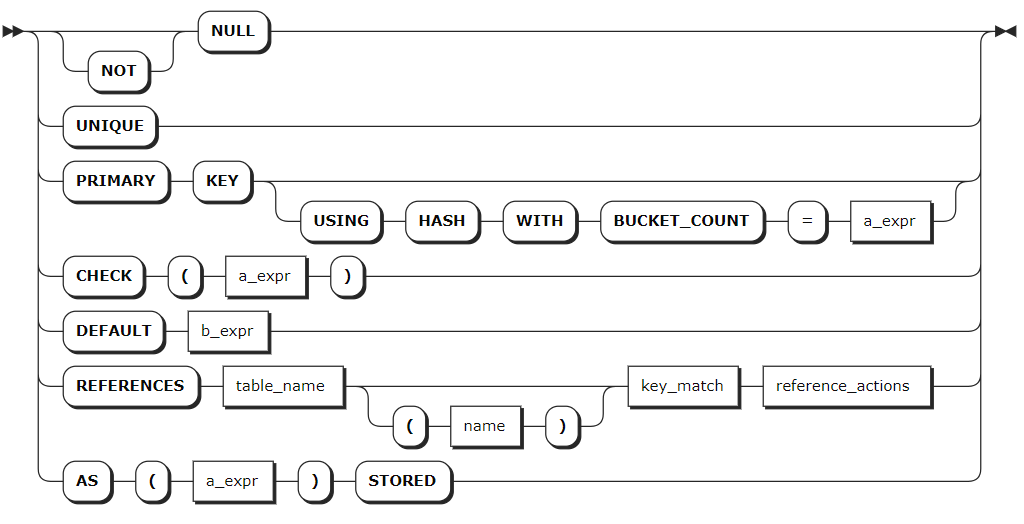
index_def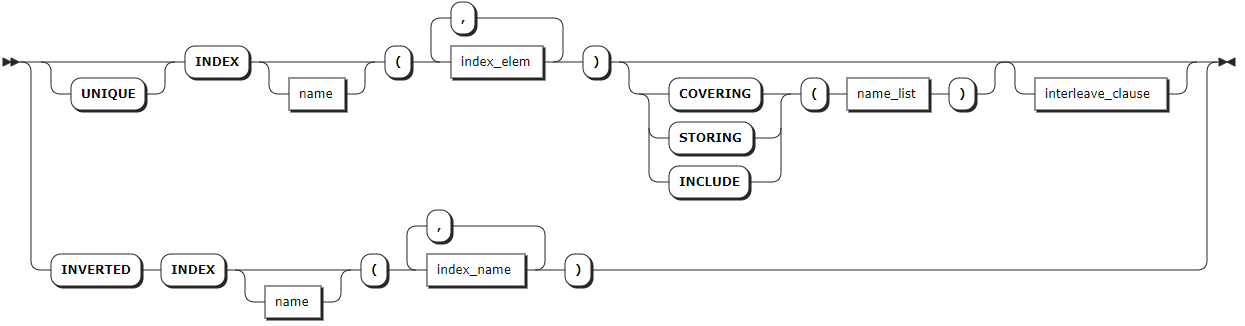
family_def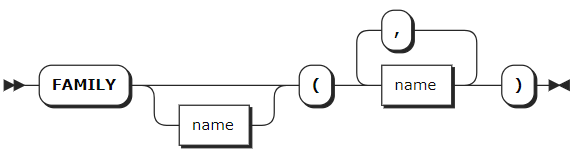
table_constraint
constraint_elem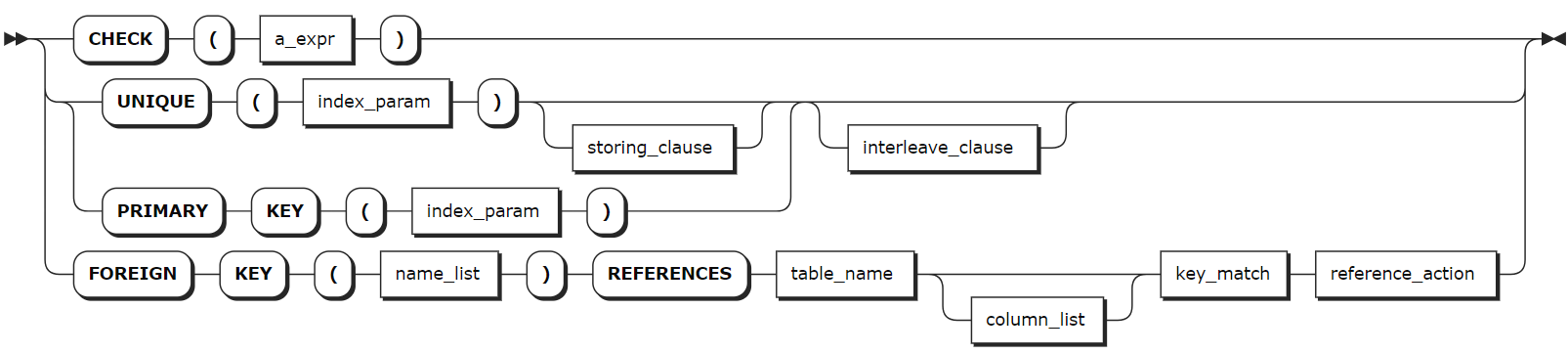
interleave-clause
partition-by-clause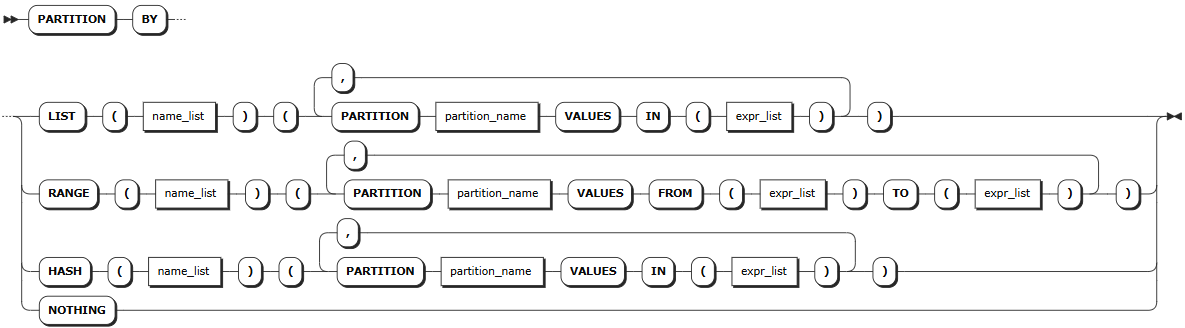
Parameters
Note
The optional parameters must be configured in an order of [<column_def> | <index_def> | <family_def> | <table_constraint>] [<interleave_clause>] [<partition_by_clause>] [COMMENT [=] <'comment_text'>]. Otherwise, the system returns an error.
| Parameter | Description |
|---|---|
IF NOT EXISTS | Optional. - When the IF NOT EXISTS keyword is used, the system creates a new table only if a table of the same name does not already exist. Otherwise, the system fails to create a new table without returning an error. - When the IF NOT EXISTS keyword is not used, the system creates a new table only if a table of the same name does not already exist. Otherwise, the system fails to create a new table and returns an error.Note IF NOT EXISTS checks the table name only. It does not check if an existing table has the same columns, indexes, constraints, etc., of the new table. |
table_name | The name of the table to create, which must be unique within its database and follow these Identifier Rules. You can use <database_name>.<table_name> to specify a table in another database. If not specified, use the table in the current database. |
column_def | A comma-separated list of column definitions. Each column requires a name and data type. Column names must be unique within the table but can have the same name as indexes or constraints. You can also specify a column qualification (a column-level constraint) in the format of <column_name> <typename> [COMMENT [=] 'commonent_text'] [col_qual_list]. Support adding comments to data columns after the data type. The comment can be placed in any order relative to other constraints of the data column. Any PRIMARY KEY, UNIQUE, and CHECK constraints defined at the column level are moved to the table-level as part of the table's creation. Use the SHOW CREATE TABLE statement to view them at the table level. |
index_def | Optional. A comma-separated list of index definitions. For each index, the column(s) to index must be specified. Or, a name can be specified. Index names must be unique within the table and follow these Identifier Rules. For details about how to create an index, see CREATE INDEX. |
family_def | Optional. A comma-separated list of column family definitions in the format of FAMILY [family_name] (name_list). Column family names must be unique within the table but can have the same name as columns, constraints, or indexes. A column family is a group of columns that are stored as a single key-value pair in the underlying key-value store. KWDB automatically groups columns into families to ensure efficient storage and performance. However, you can also manually assign columns to families. |
table_constraint | Optional. A comma-separated list of table-level constraints in the format of CONSTRAINT <constraint_name> <constraint_elem>. Constraint names must be unique within the table but can have the same name as columns, column families, or indexes. |
interleave_clause | Optional. KWDB supports optimizing query performance using interleaving indexes in the format of INTERLEAVE IN PARENT <table_name> (<name_list>). This may changes how KWDB stores data. |
partition_by_clause | Optional, allows users to define table partitions at the row level, supporting partitioning by list, range, and hash values. For more information, see Partitions. |
comment_text | Optional. Specify the comment to be associated to the table. |
Examples
Create a table without defining a primary key.
In relational databases, every table requires a primary key. If one is not explicitly defined, an INT8-typed column called
rowidis added automatically as the primary key. KWDB supports using theunique_rowid()function to ensure that new rows always default to uniquerowidvalues. The primary key is automatically indexed. Strictly speaking, a primary key's UNIQUE index is not created. It is derived from the key(s) under which the data is stored, so it takes no additional space. However, it appears as a normal UNIQUE index when using statements likeSHOW INDEX.This example creates the
logontable without defining a primary key.-- 1. Create a table named logon. CREATE TABLE logon (user_id INT, logon_date DATE); CREATE TABLE -- 2. Show columns of the logon table. SHOW COLUMNS FROM logon; column_name | data_type | is_nullable | column_default | generation_expression | indices | is_hidden | is_tag --------------+-----------+-------------+----------------+-----------------------+-----------+-----------+--------- user_id | INT4 | true | NULL | | {} | false | false logon_date | DATE | true | NULL | | {} | false | false rowid | INT8 | false | unique_rowid() | | {primary} | true | false (3 rows) -- 3. Show indexes of the logon table. SHOW INDEX FROM logon; table_name | index_name | non_unique | seq_in_index | column_name | direction | storing | implicit -------------+------------+------------+--------------+-------------+-----------+---------+----------- logon | primary | false | 1 | rowid | ASC | false | false (1 row)Create a table with a primary key defined.
This example creates a table named
t1. The table has three columns. The first column is the primary key column. The second column is configured with a UNIQUE constraint. The third column is not configured with any constraint. The system automatically creates indexes for the primary key column and the column configured with the UNIQUE constraint.-- 1. Create a table named t1. CREATE TABLE t1 (user_id INT PRIMARY KEY, user_email STRING UNIQUE, logoff_date DATE); CREATE TABLE -- 2. Show indexes of the t1 table. SHOW INDEX FROM t1; column_name | data_type | is_nullable | column_default | generation_expression | indices | is_hidden | is_tag --------------+-----------+-------------+----------------+-----------------------+-----------------------------+-----------+--------- user_id | INT4 | false | NULL | | {primary,t1_user_email_key} | false | false user_email | STRING | true | NULL | | {t1_user_email_key} | false | false logoff_date | DATE | true | NULL | | {} | false | false (3 rows)Create a table with secondary and inverted indexes.
This example creates a table named
vehicleswith secondary and inverted indexes during table creation. Secondary indexes allow efficient access to data with keys other than the primary key. Inverted indexes allow efficient access to the schemaless data in a JSONB column.-- 1. Create a table named vehicles. CREATE TABLE vehicles ( id UUID NOT NULL, city STRING NOT NULL, type STRING, owner_id UUID, creation_time TIMESTAMP, status STRING, current_location STRING, ext jsonb, CONSTRAINT "primary" PRIMARY KEY (city ASC, id ASC), INDEX vehicles_auto_index_fk_city_ref_users (city ASC, owner_id ASC), INVERTED INDEX ix_vehicle_ext (ext), FAMILY "primary" (id, city, type, owner_id, creation_time, status, current_location, ext) ); CREATE TABLE -- 2. Show indexes of the vehicles table. SHOW INDEX FROM vehicles; table_name | index_name | non_unique | seq_in_index | column_name | direction | storing | implicit -------------+---------------------------------------+------------+--------------+-------------+-----------+---------+----------- vehicles | primary | false | 1 | city | ASC | false | false vehicles | primary | false | 2 | id | ASC | false | false vehicles | vehicles_auto_index_fk_city_ref_users | true | 1 | city | ASC | false | false vehicles | vehicles_auto_index_fk_city_ref_users | true | 2 | owner_id | ASC | false | false vehicles | vehicles_auto_index_fk_city_ref_users | true | 3 | id | ASC | false | true vehicles | ix_vehicle_ext | true | 1 | ext | ASC | false | false vehicles | ix_vehicle_ext | true | 2 | city | ASC | false | true vehicles | ix_vehicle_ext | true | 3 | id | ASC | false | true (8 rows)Create a table with auto-generated unique row IDs.
This example creates a table named
users. The system automatically generates unique row IDs. The auto-generated column is a UUID-typed column with thegen_random_uuid()function as the default value.-- 1. Create a table named users. CREATE TABLE users ( id UUID NOT NULL DEFAULT gen_random_UUID(), city STRING NOT NULL, name STRING NULL, address STRING NULL, credit_card STRING NULL, CONSTRAINT "primary" PRIMARY KEY (city ASC, id ASC), FAMILY "primary" (id, city, name, address, credit_card) ); CREATE TABLE -- 2. Insert data into the users table. INSERT INTO users (name, city) VALUES ('Petee', 'new york'), ('Eric', 'seattle'), ('Dan', 'seattle'); INSERT 3 -- 3. Check the data of the table. SELECT * FROM users; id | city | name | address | credit_card ---------------------------------------+----------+-------+---------+-------------- 163dc2f6-ebe6-4aa7-aba7-c1e54062ef5c | new york | Petee | NULL | NULL 1c9d094d-f761-4c27-9b4e-9891270af25b | seattle | Dan | NULL | NULL 7fb34aa5-2034-4ffe-97d5-679316a1acce | seattle | Eric | NULL | NULL (3 rows)This example creates a table named
users. The system automatically generates unique row IDs. The auto-generated column is a BYTES-typed column with theUUID_v4()function as the default value.-- 1. Create a table named users2. CREATE TABLE users2 ( id BYTES DEFAULT UUID_v4(), city STRING NOT NULL, name STRING NULL, address STRING NULL, credit_card STRING NULL, CONSTRAINT "primary" PRIMARY KEY (city ASC, id ASC), FAMILY "primary" (id, city, name, address, credit_card) ); CREATE TABLE -- 2. Insert data into the users table. INSERT INTO users2 (name, city) VALUES ('Anna', 'new york'), ('Jonah', 'seattle'), ('Terry', 'chicago'); INSERT 3 -- 3. Check the data of the table. SELECT * FROM users2; id | city | name | address | credit_card -------------------------------------+----------+-------+---------+-------------- \x574eb48921ba42c297cdf5242f2a2c21 | chicago | Terry | NULL | NULL \x5f81aee68c4943c09f8222723910ec45 | new york | Anna | NULL | NULL \x83923b3114294cfca3df26245b54e29b | seattle | Jonah | NULL | NULL (3 rows)In either case, generated IDs will be 128-bit, sufficiently large to generate unique values. Once the table grows beyond a single key-value range's default size (64 MB), new IDs will be scattered across all of the table's ranges and likely across different nodes. This means that multiple nodes will share the load. This approach has the disadvantage of creating a primary key that may not be useful in a query directly, which can require a join with another table or a secondary index.
To store generated IDs in the same key-value range, you can use an integer-type column with the
unique_rowid()function as the default value. Or, use the SERIAL pseudo-type to automatically generate IDs.-- 1. Create a table named users3. CREATE TABLE users3 ( id INT8 DEFAULT unique_rowid(), city STRING NOT NULL, name STRING NULL, address STRING NULL, credit_card STRING NULL, CONSTRAINT "primary" PRIMARY KEY (city ASC, id ASC), FAMILY "primary" (id, city, name, address, credit_card) ); CREATE TABLE -- 2. Insert data into the users table. INSERT INTO users3 (name, city) VALUES ('Blake', 'chicago'), ('Hannah', 'seattle'), ('Bobby', 'seattle'); INSERT 3 -- 3. Check the data of the table. SELECT * FROM users3; id | city | name | address | credit_card ---------------------+---------+--------+---------+-------------- 962382415902769153 | chicago | Blake | NULL | NULL 962382415902834689 | seattle | Hannah | NULL | NULL 962382415902867457 | seattle | Bobby | NULL | NULL (3 rows)Upon insert or upsert, the
unique_rowid()function generates a default value from the timestamp and ID of the node executing the insert. Such time-ordered values are likely to be globally unique except in cases where a very large number of IDs (100,000+) are generated per node per second. Also, there can be gaps and the order is not completely guaranteed.Create a table with a foreign key constraint.
Foreign key constraints guarantee a column only uses values that already exist in the column it references, which must be from another table. This constraint enforces referential integrity between the two tables.
There are two most important rules that govern foreign keys:
- You must create an index for the primary key column. If you do not define any indexes using
INDEX,PRIMARY KEYorUNIQUEduring the table creation, the system will automatically creates a secondary index for the primary key column. - The referenced columns must contain unique values. This means the
REFERENCESclause must use exactly the same columns as a primary key or UNIQUE constraint.
You can include a foreign key action to specify what happens when a column referenced by a foreign key constraint is updated or deleted. The default actions are
ON UPDATE NO ACTIONandON DELETE NO ACTION. This example usesON DELETE CASCADE, which means when a row referenced by a foreign key constraint is deleted, all dependent rows are also deleted.-- 1. Create a table named users. CREATE TABLE users ( id UUID PRIMARY KEY DEFAULT gen_random_UUID(), city STRING, name STRING, address STRING, credit_card STRING, dl STRING UNIQUE CHECK (LENGTH(dl) < 8) ); CREATE TABLE -- 2. Create a table named vehicles. The vehicles table references the users table and uses its id row's value as the value of the owner_id row. CREATE TABLE vehicles ( id UUID NOT NULL DEFAULT gen_random_UUID(), city STRING NOT NULL, type STRING, owner_id UUID REFERENCES users(id) ON DELETE CASCADE, creation_time TIMESTAMP, status STRING, current_location STRING, ext jsonb, CONSTRAINT "primary" PRIMARY KEY (city ASC, id ASC), INDEX vehicles_auto_index_fk_city_ref_users (city ASC, owner_id ASC), INVERTED INDEX ix_vehicle_ext (ext), FAMILY "primary" (id, city, type, owner_id, creation_time, status, current_location, ext) ); CREATE TABLE -- 3. Show the created vehicles table. SHOW CREATE TABLE vehicles; table_name|create_statement ----------+---------------- vehicles |CREATE TABLE vehicles ( id UUID NOT NULL DEFAULT gen_random_UUID(), city STRING NOT NULL, type STRING NULL, owner_id UUID NULL, creation_time TIMESTAMP NULL, status STRING NULL, current_location STRING NULL, ext jsonb NULL, CONSTRAINT "primary" PRIMARY KEY (city ASC, id ASC), CONSTRAINT fk_owner_id_ref_users FOREIGN KEY (owner_id) REFERENCES users(id) ON DELETE CASCADE, INDEX vehicles_auto_index_fk_city_ref_users (city ASC, owner_id ASC), INVERTED INDEX ix_vehicle_ext (ext), INDEX vehicles_auto_index_fk_owner_id_ref_users (owner_id ASC), FAMILY "primary" (id, city, type, owner_id, creation_time, status, current_location, ext) ) (1 row) -- 4. Insert data into the users table. INSERT INTO users (name, dl) VALUES ('Annika', 'ABC-123'); INSERT 1 -- 5. Check the data of the users table. SELECT * FROM users; id |city|name |address|credit_card|dl ------------------------------------+----+------+-------+-----------+------- fc47d311-e9c8-4627-9342-cd23822bc903| |Annika| | |ABC-123 (1 row) -- 6. Insert data into the vehicles table. INSERT INTO vehicles (city, owner_id) VALUES ('seattle', 'fc47d311-e9c8-4627-9342-cd23822bc903'); INSERT 1 -- 7. Check the data of the vehicles table. SELECT * FROM vehicles; id |city |type|owner_id |creation_time|status|current_location|ext ------------------------------------+-------+----+------------------------------------+-------------+------+----------------+--- 75f4d3fd-b444-4c89-bdce-449974a35fed|seattle| |fc47d311-e9c8-4627-9342-cd23822bc903| | | | (1 row) -- 8. Remove the row with the id of fc47d311-e9c8-4627-9342-cd23822bc903 from the users table. DELETE FROM users WHERE id = 'fc47d311-e9c8-4627-9342-cd23822bc903'; DELETE 1 -- 9. Check the data of the vehicles table. SELECT * FROM vehicles; id|city|type|owner_id|creation_time|status|current_location|ext --+----+----+--------+-------------+------+----------------+--- (0 row)- You must create an index for the primary key column. If you do not define any indexes using
Create a table with a check constraint.
This example creates the
userstable. The first column is the primary key, and the last column is defined with a UNIQUE constraint and a CHECK constraint that limits the length of the string. The system automatically creates indexes for the primary key column and the column with UNIQUE constraint.-- 1. Create a table named users. CREATE TABLE users ( id UUID PRIMARY KEY, city STRING, name STRING, address STRING, credit_card STRING, dl STRING UNIQUE CHECK (LENGTH(dl) < 8) ); CREATE TABLE -- 2. Show columns of the users table. SHOW COLUMNS FROM users; column_name | data_type | is_nullable | column_default | generation_expression | indices | is_hidden | is_tag --------------+-----------+-------------+-------------------+-----------------------+-------------------------+-----------+--------- id | UUID | false | gen_random_uuid() | | {primary,users_dl_key} | false | false city | STRING | true | NULL | | {} | false | false name | STRING | true | NULL | | {} | false | false address | STRING | true | NULL | | {} | false | false credit_card | STRING | true | NULL | | {} | false | false dl | STRING | true | NULL | | {users_dl_key} | false | false (6 rows) -- 3. Show indexes of the users table. SHOW INDEX FROM users; table_name | index_name | non_unique | seq_in_index | column_name | direction | storing | implicit -------------+---------------+------------+--------------+-------------+-----------+---------+----------- users | primary | false | 1 | id | ASC | false | false users | users_dl_key | false | 1 | dl | ASC | false | false users | users_dl_key | false | 2 | id | ASC | false | true (3 rows)Create a table that mirrors key-value storage.
KWDB is a distributed SQL database built on a transactional and strongly-consistent key-value store. Although it is not possible to access the key-value store directly, you can mirror direct access using a table of two columns, with one set as the primary key.
-- 1. Create a table named kv.

CREATE TABLE kv (k INT PRIMARY KEY, v BYTES);
CREATE TABLE

-- 2. Insert data into the users table. When the table has no indexes or foreign keys, UPSERT/UPDATE/DELETE statements translate to key-value operations with minimal overhead. For example, the following UPSERT to add or replace a row in the table would translate into a single key-value Put operation.

UPSERT INTO kv VALUES (1, b'hello');
UPSERT 1
Create a table from a
SELECTstatement.You can use the
CREATE TABLE ASstatement to create a new table from the results of aSELECTstatement. This example uses the query results of the users table to create a new table namedusers_ny.-- 1. Use the WHERE clause to check data of the new york column. SELECT * FROM users WHERE city = 'new york'; id |city |name |address|credit_card ------------------------------------+--------+-----+-------+----------- cd0bc9f9-707b-436c-9204-606244f4c4dd|new york|Petee| | (1 row) -- 2. Create a table named users_ny based ont the query results of the users table. CREATE TABLE users_ny AS SELECT * FROM users WHERE city = 'new york'; CREATE TABLE -- 3. Check the data of the users_ny table. SELECT * FROM users_ny; id |city |name |address|credit_card ------------------------------------+--------+-----+-------+----------- cd0bc9f9-707b-436c-9204-606244f4c4dd|new york|Petee| | (1 row)Create a table with a computed column.
This example creates a table named
users, where thefull_namecolumn is computed from thefirst_nameandlast_namecolumns.-- 1. Create a table named users. CREATE TABLE users (id UUID PRIMARY KEY DEFAULT gen_random_UUID(), city STRING, first_name STRING, last_name STRING, full_name STRING AS (CONCAT(first_name, ' ', last_name)) STORED, address STRING, credit_card STRING, dl STRING UNIQUE CHECK (LENGTH(dl) < 8)); CREATE TABLE -- 2. Insert data into the table. INSERT INTO users (first_name, last_name) VALUES ('Lola', 'McDog'), ('Carl', 'Kimball'), ('Ernie', 'Narayan'); INSERT 3 -- 3. Check the data of the table. SELECT * FROM users; id |city|first_name|last_name|full_name |address|credit_card|dl ------------------------------------+----+----------+---------+-------------+-------+-----------+-- 6d6b50e6-1492-4e57-8a12-12617e55c6f5| |Ernie |Narayan |Ernie Narayan| | | c4803c2e-c2e2-49bf-b912-80072229d785| |Lola |McDog |Lola McDog | | | f363db85-dfd5-40b8-a68e-f12ca8a4b84f| |Carl |Kimball |Carl Kimball | | | (3 rows)
SHOW TABLES
The SHOW TABLES statement lists the tables or views in a schema or database.
Privileges
The user must have any privilege on the specified table(s).
Syntax
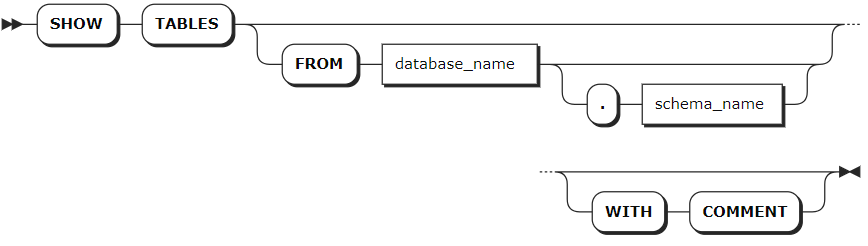
Parameters
| Parameter | Description |
|---|---|
database_name | Optional. The name of the database for which to show tables. If not specified, use the current database. |
schema_name | Optional. The name of the schema for which to show tables. If not specified, use the first schema (the public schema) in the query path. |
WITH COMMENT | Optional. Show a table's comments. |
Examples
Show all the tables in the current database.
show tables;If you succeed, you should see an output similar to the following:
table_name|table_type
----------+----------
testblob  |BASE TABLE
users     |BASE TABLE
(2 rows)
Show tables in the
information_schemaschema of the current database.SHOW TABLES FROM information_schema;If you succeed, you should see an output similar to the following:
table_name
---------------------------------
administrable_role_authorizations
applicable_roles
check_constraints
column_privileges
columns
CONSTRAINT_column_usage
enabled_roles
key_column_usage
parameters
...
(21 rows)
Show tables in a specified database.
SHOW TABLES FROM system.public;If you succeed, you should see an output similar to the following:
table_name
-------------------------------
audits
bo_white_list
comments
descriptor
jobs
kwdb_attribute
kwdb_instance
kwdb_k_schema_option
kwdb_node_choice_info
kwdb_node_info
...
(52 rows)
Show a table's comment.
-- 1. Add a comment for the users table.

COMMENT ON TABLE users IS 'This table contains information about users.';
COMMENT ON TABLE

-- 2. Check comments of the users table.

SHOW TABLES WITH COMMENT;
  table_name   | table_type |                   comment
----------------+------------+-----------------------------------------------
  customers     | BASE TABLE |
  orders        | BASE TABLE |
  packages      | BASE TABLE |
  testblob      | BASE TABLE |
  users         | BASE TABLE | This table contains information about users.
(5 rows)
SHOW CREATE TABLE
The SHOW CREATE [TABLE] <table_name> statement shows the CREATE TABLE statement for an existing table.
Privileges
The user must have any privilege on the specified table(s).
Syntax

Parameters
| Parameter | Description |
|---|---|
database_name | The name of the database for which to show created tables. If not specified, use the current database. |
table_name | The name of the table to show. |
Examples
Show the
CREATE TABLEstatement for a table in the current database.SHOW CREATE TABLE accounts; table_name| create_statement ------------+---------------------------------------------------- accounts | CREATE TABLE accounts ( | id INT8 NOT NULL DEFAULT unique_rowid(), | name STRING NULL, | balance DECIMAL NULL, | enabled BOOL NULL, | CONSTRAINT "primary" PRIMARY KEY (id ASC), | FAMILY "primary" (id, name, balance, enabled) | ) (1 row)Show the
CREATE TABLEstatement for a table in a specified database.SHOW CREATE TABLE r.t6; table_name | create_statement --------------+----------------------------------- r.public.t6 | CREATE TABLE t6 ( | c1 NCHAR NULL, | FAMILY "primary" (c1, rowid) | ) (1 row)
ALTER TABLE
The ALTER TABLE statement performs the following operations:
- Add columns to tables, update or rename columns of tables, and remove columns from tables.
- Add constraints to tables, validate or rename constraints of tables, and remove constraints from tables.
- Modify the primary key columns and zone configurations of tables.
- Modify zone configurations of tables.
- Create table partitions.
- Rename tables. The renamed tables can be migrated to a new database or schema. Avoid renaming a relational table in the time-series database.
- Create or remove a range split at the specified rows in tables to improve performance.
- Redistribute data of tables.
- Inject statistics into tables.
Privileges
Add columns to tables, update or rename columns of tables, and remove columns from tables: the user must be a member of the
adminrole or have been granted theCREATEprivilege on the specified table(s). By default, therootuser belongs to theadminrole.Add constraints to tables, validate or rename constraints of tables, and remove constraints from tables: the user must be a member of the
adminrole or have been granted theCREATEprivilege on the specified table(s). By default, therootuser belongs to theadminrole.Modify primary key columns of tables: the user must be a member of the
adminrole or have been granted theCREATEprivilege on the specified table(s). By default, therootuser belongs to theadminrole.Modify zone configurations of tables: the user must be a member of the
adminrole or have been granted theCREATEorZONECONFIGprivilege on the specified table(s). By default, therootuser belongs to theadminrole.Create table partitions: the user must be a member of the
adminrole or have been granted theCREATEprivilege on the specified table(s). By default, therootuser belongs to theadminrole.Rename tables
- Rename tables in the current database: the user must be a member of the
adminrole or have been granted theCREATEprivilege on the specified database(s) and theDROPprivilege on the original table. By default, therootuser belongs to theadminrole. It is not possible to rename a table referenced by a view. - Rename tables and migrate them to other schema: the user must be a member of the
adminrole or have been granted theCREATEprivilege on the specified database(s) and theDROPprivilege on the original table. By default, therootuser belongs to theadminrole. - Rename tables and migrate them to other databases: the user must be a member of the
adminrole or have been granted theCREATEprivilege on the specified database(s) and theDROPprivilege on the original table. By default, therootuser belongs to theadminrole.
- Rename tables in the current database: the user must be a member of the
Create or remove a range split at the specified rows in tables: the user must be a member of the
adminrole or have been granted theINSERTprivilege on the specified table(s). By default, therootuser belongs to theadminrole.
Syntax
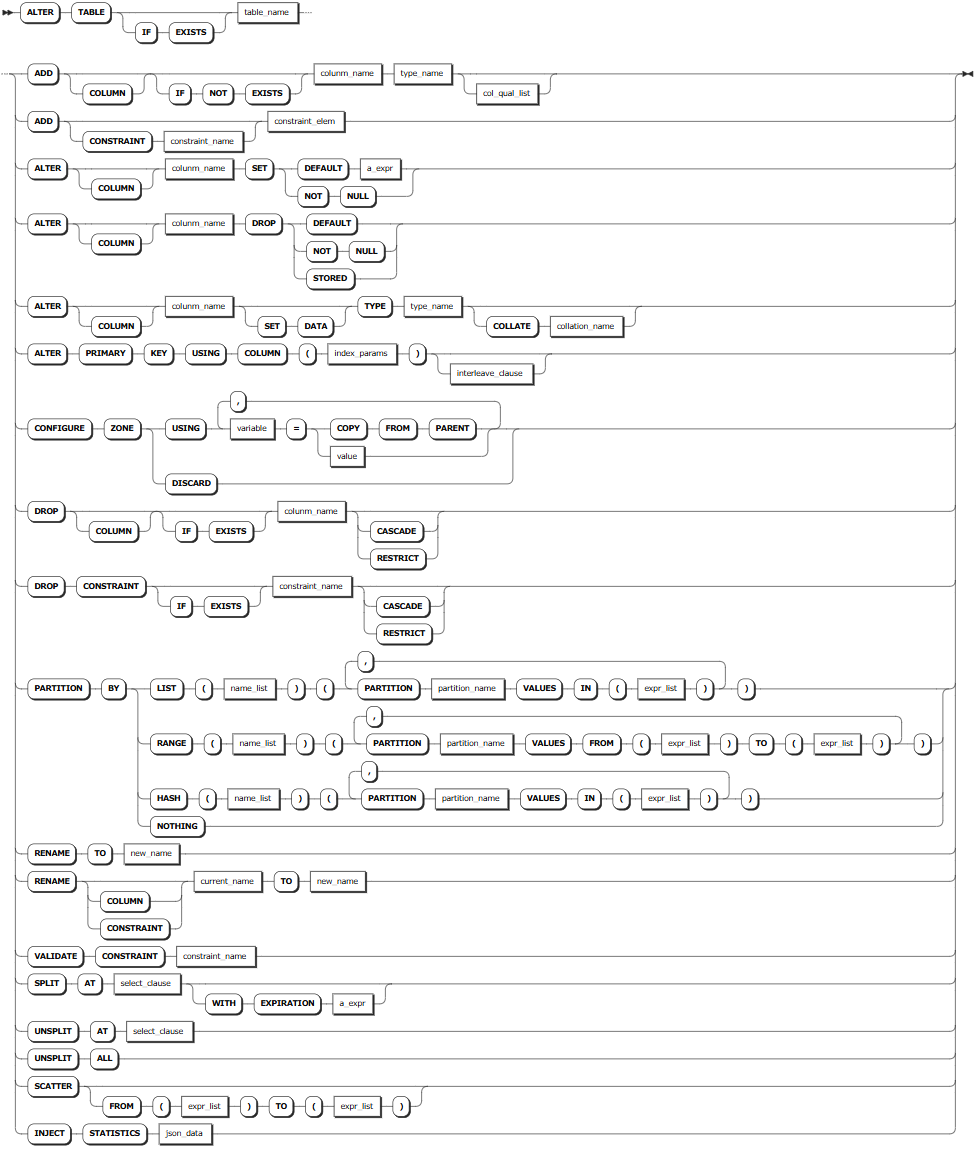
Supported Operations
- ADD
ADD COLUMN: Add columns. You need to specify the column name and data type. TheCOLUMNkeyword is optional. If not used, columns will be added by default. TheIF NOT EXISTSkeyword is optional. When theIF NOT EXISTSkeyword is used, the system creates a new column only if a column of the same name does not already exist. Otherwise, the system fails to create a new column without returning an error. When theIF NOT EXISTSkeyword is not used, the system creates a new column only if a column of the same name does not already exist. Otherwise, the system fails to create a new column and returns an error.ADD CONSTRAINT: Add constraints. For details, see ADD CONSTRAINT.
- ALTER
ALTER COLUMN: Change the default value, data type, and whether or not it's nullable.ALTER PRIMARY KEY: Change the primary of the table.
CONFIGURE ZONE: Change zone configurations of the table. For details, see Zones.- DROP
DROP COLUMN: Rremove columns. You need to specify the column name. TheCOLUMNkeyword is optional. If not used, columns will be removed by default. When theIF EXISTSkeyword is used, the system removes the column only if the target table has already existed. Otherwise, the system fails to remove the column without returning an error. When theIF EXISTSkeyword is not used, the system removes the column only if the target table has already existed. Otherwise, the system fails to remove the column and returns an error.DROP CONSTRAINT: Remove constraints. For details, see DROP CONSTRAINT.
PARTITION BY: Create partitions for the table. For details, see Partitions.- RENAME
RENAME TO: Change the names of tables.RENAME COLUMN: Change the names of columns. For details, see ALTER COLUMN.RENAME CONSTRAINT: Change the names of constraints. For details, see RENAME CONSTRAINT.
VALIDATE CONSTRAINT: Validate whether the column value is matched with the constraints on the column.SPLIT AT: Create a split at the specified row or range in the table to optimize the table performance when the data is distributed unevenly or there are hotspots, etc. You can use theWITH EXPIRATIONclause to set the expiration time of the split. Therefore, the system can automatically remove the splits after the specified time.UNSPLIT AT: Remove a split at the specified row or range from the table. You can use theSELECTclause to specify the position of the split to be removed.UNSPLIT ALL: Remove all range splits from the table to optimize the table performance when the data is distributed unevenly or there are hotspots, etc.SCATTER: Redistribute data of the tables to achieve better load balancing. You can use theFROMclause to specify the data ranges to be redistributed.INJECT STATISTICS: An experimental feature used to inject statistics into a table. It can be used for test and debugging, and should be used with caution in a production environment.
Parameters
| Parameter | Description |
|---|---|
table_name | The name of the table. You can use <database_name>.<table_name> to specify a table in another database. If not specified, use the table in the current database. |
column_name | The name of the column. The new column name must be unique within the table. |
typename | The data type of the column. |
col_qual_list | A list of column qualifications. KWDB supports the following qualifications: - <col_qualification_elem>: NULL, NOT NULL, UNIQUE, PRIMARY KEY, CHECK, DEFAULT, REFERENCES, AS.- CONSTRAINT <constraint_name> <col_qualification_elem> - COLLATE <collation_name> - FAMILY <family_name>: If no column family is specified, the column is added to the first column family. - CREATE FAMILY [<family_name>] Note KWDB does not support adding columns with a FOREIGN KEY constraint. For details about how to add a FOREIGN KEY constraint to a column, see ADD CONSTRAINT. |
constraint_name | The name of the constraint. The constraint name must be unique within the table and must follow these Identifier Rules. |
constraint_elem | The constraints to add. KWDB supports the following constrains: - CHECK: specify the column values that match the specified conditions ir expressions. - UNIQUE: specify that each non-NULL value in the constrained column must be unique. - FOREIGN KEY: before adding a FOREIGN KEY constraint to a column, the column value must refer to another column. If not, you can use the CREATE INDEX statement to create an index and then add a FOREIGN KEY constraint. For details, see ADD CONSTRAINT. |
a_expr | The default value to use. |
collation_name | The name of the collation. |
index_params | The indexes. For details, see Indexes. |
interleave_clause | Optional. KWDB supports optimizing query performance using interleaving indexes in the format of INTERLEAVE IN PARENT <table_name> (<name_list>). This may changes how KWDB stores data. |
json_data | Inject statistics into the table. The statistics must be in JSON format and enclosed in single quotes (''). |
Examples
Rename a table.
-- 1. Check tables in the current database.

SHOW TABLES;
table_name
----------
kv
users
(2 rows)

-- 2. Rename the users table to re_users.

ALTER TABLE users RENAME TO re_users;
ALTER TABLE

-- 3. Check tables in the current database.

SHOW TABLES;
table_name
----------
kv
re_users
(2 rows)
Create a split.
This example creates a split for the
vehiclestable base on the value of thevehicleidcolumn.-- 1. Check data of the table. SELECT * FROM vehicles; vehicleid | licenseplate | owner | model | year ------------+--------------+-------+-------+------- 1 | JA11111 | Mark | BMW | 2020 2 | JA22222 | John | Buick | 2022 (2 rows) -- 2. Set a split. ALTER TABLE vehicles SPLIT AT SELECT vehicleid from vehicles where vehicleid = 1; key | pretty | split_enforced_until -----------+---------------+----------------------------------- \xda8989 | /Table/82/1/1 | 2262-04-11 23:47:16.854776+00:00 (1 row)Remove all splits.
ALTER TABLE vehicles UNSPLIT ALL;Redistribute data of a table.
ALTER TABLE vehicles SCATTER;
  key  |  pretty
-------+------------
  \xda | /Table/82
(1 row)
Inject statistics into a table.
ALTER TABLE kv INJECT STATISTICS '[{"name":"__auto__","created_at":"2000-01-01 00:00:00+00:00","columns":["k"],"row_count":2223475796173842391,"distinct_count":405727959889499775,"null_count":1571059772371006376},{"name":"__auto__","created_at":"2000-01-01 00:00:00+00:00","columns":["v"],"row_count":2223475796173842391,"distinct_count":2209895385460769436,"null_count":131122807856894709}]';
DROP TABLE
The DROP TABLE statement removes a table and all its indexes and associated triggers from a database.
Privileges
- The user must be a member of the
adminrole or have been granted theDROPprivilege on the specified table(s). By default, therootuser belongs to theadminrole. - When the target table has FOREIGN KEY constraints or is interleaved with other tables, the user must have been granted the
REFERENCESprivilege on the interleaved tables. - When the target table is dependent on a view, the user must have been granted the
DROPprivilege on the specified table(s) and all dependent views.
Syntax

Parameters
| Parameter | Description |
|---|---|
IF EXISTS | Optional. - When the IF EXISTS keyword is used, the system removes the table only if the table has already existed. Otherwise, the system fails to remove the table without returning an error. - When the IF EXISTS keyword is not used, the system removes the table only if the table has already existed. Otherwise, the system fails to remove the table and returns an error. |
table_name_list | A comma-separated list of table names. KWDB supports removing one or more tables at once. |
CASCADE | Optional. Remove the target table and its dependent objects. The CASCADE keyword does not list objects it removes, so it should be used cautiously. |
RESTRICT | (Default) Optional. Do not remove the table if any objects depend on it. |
Examples
This table removes a table named kv from the current database.
-- 1. Check tables in the current database.

SHOW TABLES;
table_name
----------
kv
re_users
(2 rows)

-- 2. Remove the kv table.
DROP TABLE kv;
DROP TABLE

-- 3. Check tables in the current database.

SHOW TABLES;
table_name
----------
re_users
(1 row)