Comments
COMMENT ON
The COMMENT ON statement associates comments to databases, tables, columns, indexes, or stored procedures.
Privileges
The user must be a member of the admin role or have the CREATE privilege on the object they are commenting on. By default, the root user belongs to the admin role.
Syntax
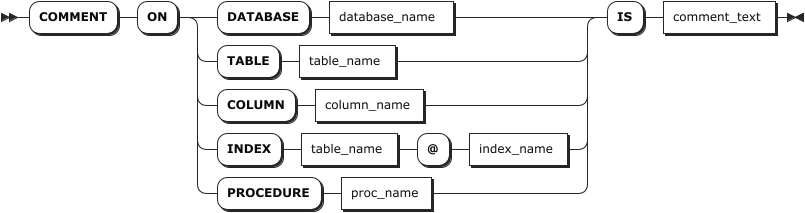
Parameters
| Parameter | Description |
|---|---|
database_name | The name of the database to comment on. |
table_name | The name of the table to comment on. |
column_name | The name of the column to comment on. |
index_name | The name of the index to comment on. |
proc_name | The name of the stored procedure to comment on. |
comment_text | The comment to be associated to the object. |
Examples
Add a comment to a database.
-- 1. Add a comment to the db3 database.

COMMENT ON DATABASE db3 IS 'database for order statistics';
COMMENT ON DATABASE

-- 2. Check the database's comments.

SHOW DATABASES WITH COMMENT;
  database_name | engine_type |            comment
----------------+-------------+--------------------------------
  db1           | RELATIONAL  | NULL
  db2           | RELATIONAL  | NULL
  db3           | RELATIONAL  | database for order statistics
...
(6 rows)
Add a comment to a table.
-- 1. Add a comment to the orders table.

COMMENT ON TABLE orders IS 'orders from 2020 till now.';
COMMENT ON TABLE

-- 2. Check the table's comments.

SHOW TABLES WITH COMMENT;
  table_name | table_type |          comment
-------------+------------+-----------------------------
  orders     | BASE TABLE | orders from 2020 till now.
  order_list | BASE TABLE |
(2 rows)
Add a comment to a column.
-- 1. Add a comment to the id column of the orders table.

COMMENT ON COLUMN orders.id IS 'auto-generated';
COMMENT ON COLUMN

-- 2. Check the column's comments.

SHOW COLUMNS FROM orders WITH COMMENT;
  column_name | data_type | is_nullable | column_default  | generation_expression |                 indices                 | is_hidden | is_tag |    comment
--------------+-----------+-------------+-----------------+-----------------------+-----------------------------------------+-----------+--------+-----------------
  id          | INT4      |    false    | NULL            |                       | {primary,orders_customer_id_key_rename} |   false   | false  | auto-generated
  date        | TIMESTAMP |    false    | NULL            |                       | {}                                      |   false   | false  | NULL
  priority    | INT4      |    true     | 1:::INT8        |                       | {}                                      |   false   | false  | NULL
  customer_id | INT4      |    true     | NULL            |                       | {orders_customer_id_key_rename}         |   false   | false  | NULL
  status      | STRING    |    true     | 'open':::STRING |                       | {}                                      |   false   | false  | NULL
(5 rows)
Add a comment to an index.
-- 1. Add a comment to the primary index of the orders table.

COMMENT ON INDEX orders @ primary is 'auto-generated';
COMMENT ON INDEX

-- 2. Check the index's comments.

SHOW INDEXES FROM orders WITH COMMENT;
  table_name |          index_name           | non_unique | seq_in_index | column_name | direction | storing | implicit |    comment
-------------+-------------------------------+------------+--------------+-------------+-----------+---------+----------+-----------------
  orders     | primary                       |   false    |            1 | id          | ASC       |  false  |  false   | auto-generated
  orders     | orders_customer_id_key_rename |   false    |            1 | customer_id | ASC       |  false  |  false   | NULL
  orders     | orders_customer_id_key_rename |   false    |            2 | id          | ASC       |  false  |   true   | NULL
(3 rows)
Add a comment to a stored procedure.
-- 1. Add a comment to the proc1 stored procedure.

COMMENT ON PROCEDURE proc1 IS 'test query sql and if else logical';

-- 2. Check the stored procedure's comments.

SHOW PROCEDURES WITH COMMENT;
procedure_name |              comment
-----------------+-------------------------------------
proc1           | test query sql and if else logical
(1 row)