DELETE
The DELETE statement deletes rows from a table.
Note
By default, when the sql_safe_updates session variable is set to true, you cannot delete all data. To delete all data, you need to set the sql_safe_updates session variable to false.
Privileges
The user must be a member of the admin role or have been granted the SELECT and DELETE privileges on the specified table(s).
Syntax
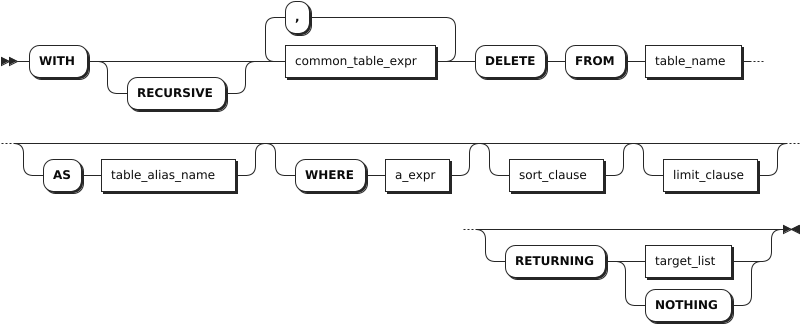
common_table_expr
sort_clause
limit_clause
target_list
Parameters
| Parameter | Description |
|---|---|
common_table_expr | You can use it in combination with the WITH keyword as the WITH AS clause. It provides an alias for a frequently-performed SQL subquery before it is used in a larger query context. Therefore, the system can directly recall the SQL subquery using the alias. This improves the query performance. |
table_name | The name of the table that contains the rows to delete. |
AS table_alias_name | An alias for the table name. When an alias is provided, it completely hides the actual table name. |
WHERE a_expr | The filtering statement for the DELETE statement, which is used to delete rows that return TRUE. a_expr must be an expression that returns Boolean values using columns (e.g., <column> = <value>). Without a WHERE clause, the DELETE statement deletes all rows from the table. To delete all rows in a table, it is recommended to use the TRUNCATE statement. |
RETURNING target_list | Return values based on rows deleted, where target_list can be specific column names from the table. * means returning values for all columns while you can also use computations using scalar expressions to specify columns. To return nothing in the response, not even the number of rows updated, use RETURNING NOTHING. |
Examples
These examples assume that you have created a table named account_details and inserted data into the table.
-- 1. Create the table.

CREATE TABLE account_details(account_id INT8 DEFAULT unique_rowid() PRIMARY KEY, balance DECIMAL, account_type STRING);
CREATE TABLE

-- 2. Insert data into the table.

INSERT INTO account_details VALUES(1, 20000, 'save'), (2, 30000, 'save'), (3, 40000, 'del'), (4, 50000, 'insert');
INSERT 4

-- 3. Check data of the table.

SELECT * FROM account_details;
  account_id | balance | account_type
-------------+---------+---------------
           1 |   20000 | save
           2 |   30000 | save
           3 |   40000 | del
           4 |   50000 | insert
(4 rows)
Delete rows using columns with the Primary Key or UNIQUE constraints.
DELETE FROM account_details WHERE account_id = 1;
DELETE 1

SELECT * FROM account_details;
  account_id | balance | account_type
-------------+---------+---------------
          2 |   30000 | save
          3 |   40000 | del
          4 |   50000 | insert
(3 rows)
Delete rows using columns with non-UNIQUE constraints.
DELETE FROM account_details WHERE account_type='save';
DELETE 1

SELECT * FROM account_details;
  account_id | balance | account_type
-------------+---------+---------------
          3 |   40000 | del
          4 |   50000 | insert
(2 rows)
Return deleted rows.
DELETE FROM account_details WHERE account_id = 3 RETURNING *;
DELETE 1;
  account_id | balance | account_type
-------------+---------+---------------
          3 |   40000 | del
(1 row)


SELECT * FROM account_details;
  account_id | balance | account_type
-------------+---------+---------------
          4 |   50000 | insert
(1 row)
Delete all rows.
SET sql_safe_updates = false;
SET

DELETE FROM account_details;
DELETE 1


SELECT * FROM account_details;
account_id|balance|account_type
----------+-------+------------
(0 rows)