Sessions
SHOW SESSIONS
The SHOW SESSIONS statement lists details about currently active sessions, including:
- The node connected to
- The address of the client that opens the session
- How long the connection has been open
- Which queries are active in the session
- Which query has been running longest in the session
These details let you monitor the overall state of client connections and identify those that may need further investigation or adjustment.
Privileges
- Members of the
adminrole (By default, therootuser belongs to theadminrole.): view any currently active sessions. - Users who are not members of the
adminrole: view only their own currently active sessions.
Syntax
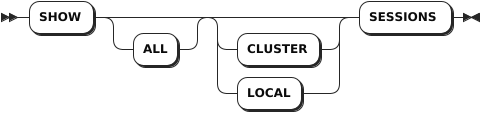
Parameters
| Parameter | Description |
|---|---|
CLUSTER | Optional. List the active sessions across all nodes of the cluster. |
LOCAL | Optional. List the active sessions on the local node. |
Examples
List the active sessions across all nodes of the cluster.
SHOW ALL CLUSTER SESSIONS;
node_id|session_id                      |user_name|client_address |application_name|active_queries           |last_active_query                                                                         |session_start             |oldest_query_start
-------+--------------------------------+---------+---------------+----------------+-------------------------+------------------------------------------------------------------------------------------+--------------------------+-------------------------
1      |1757a0b984408f3e0000000000000001|root     |127.0.0.1:41024|ksql            |SHOW ALL CLUSTER SESSIONS|CANCEL SESSIONS (SELECT session_id FROM [SHOW CLUSTER SESSIONS] WHERE user_name = 'stone')|2023-04-20 11:21:44.494261|2023-04-20 11:29:06.56467
(1 row)
List the active queries on the local node.
SHOW ALL LOCAL SESSIONS;
node_id|session_id                      |user_name|client_address |application_name|active_queries         |last_active_query        |session_start             |oldest_query_start
-------+--------------------------------+---------+---------------+----------------+-----------------------+-------------------------+--------------------------+--------------------------
1      |1757a0b984408f3e0000000000000001|root     |127.0.0.1:41024|ksql            |SHOW ALL LOCAL SESSIONS|SHOW ALL CLUSTER SESSIONS|2023-04-20 11:21:44.494261|2023-04-20 11:29:54.619584
(1 row)
Use a
SELECTstatement to filter the list of currently active sessions by one or more of the response fields.SELECT * FROM [SHOW ALL CLUSTER SESSIONS] WHERE user_name = 'root'; node_id|session_id |user_name|client_address |application_name|active_queries |last_active_query |session_start |oldest_query_start -------+--------------------------------+---------+---------------+----------------+------------------------------------------------------------------+-----------------------+--------------------------+-------------------------- 1 |1757a0b984408f3e0000000000000001|root |127.0.0.1:41024|ksql |SELECT * FROM [SHOW ALL CLUSTER SESSIONS] WHERE user_name = 'root'|SHOW ALL LOCAL SESSIONS|2023-04-20 11:21:44.494261|2023-04-20 11:30:52.835679 (1 row)
CANCEL SESSION
The CANCEL SESSION statement stops long-running sessions.
Privileges
Only the root user can cancel any currently active sessions. Other users can only cancel their own currently active sessions.
Syntax

Parameters
| Parameter | Description |
|---|---|
session_id | The ID of the session to cancel, which can be found with the SHOW SESSIONS statement. The CANCEL SESSION statement accepts a single session ID. If a subquery is used and returns multiple query IDs, the CANCEL SESSION statement will fail. To cancel multiple sessions, use the CANCEL SESSIONS statement. |
select_stmt | A selection query that returns IDs of sessions to cancel. |
Examples
Cancel a single session.
-- 1. Use the SHOW SESSIONS statement to get the ID of a session.
SHOW SESSIONS;
node_id|session_id                      |user_name|client_address |application_name|active_queries       |last_active_query                                          |session_start            |oldest_query_start
-------+--------------------------------+---------+---------------+----------------+---------------------+-----------------------------------------------------------+-------------------------+--------------------------
1      |17579fe0cd5626660000000000000001|root     |127.0.0.1:57918|ksql            |SHOW CLUSTER SESSIONS|CANCEL SESSIONS VALUES ('15d9a5cdf28b9f840000000000000001')|2023-04-20 11:06:13.71252|2023-04-20 11:20:54.694478
(1 row)

-- 2. Cancel the session based on the session ID.
CANCEL SESSION '17579fe0cd5626660000000000000001';
CANCEL SESSIONS 1
Cancel multiple sessions.
CANCEL SESSIONS (SELECT session_id FROM [SHOW SESSIONS] WHERE user_name = 'KWDB');
CANCEL SESSIONS 2
SHOW TRACE FOR SESSION
KWDB uses OpenTelemetry libraries for tracing, which also means that it can be easily integrated with OpenTelemetry-compatible trace collectors.
- A trace represents information about the sub-operations performed as part of a high-level operation (a query or a transaction). This information is internally represented as a tree of spans.
- A span is a named, timed operation that describes a contiguous segment of work in a trace. Parent spans link to multiple child spans, each representing a sub-operation. Child spans can be further nested to describe hierarchical operations. Different spans can represent operations or sub-operations that executed either sequentially or in parallel with respect to each other. (This possibly-parallel nature of execution is one of the important things that a trace is supposed to describe.) The operations described by a trace may be distributed, so different spans may describe operations executed by different nodes.
- A message is a string with timing information. Each span can contain a list of messages. These messages are similar to the messages in node-level log files. Unlike node-level log files, tracing messages capture all severity levels, whereas log files, by default, do not. Thus, trace messages are more detailed than logs but only contain information generated by specific trace operations.
The SHOW TRACE FOR SESSION statement returns details about how KWDB executes a statement or series of statements recorded during a session. These details include messages and timing information from all nodes involved in the execution, providing visibility into the actions taken by KWDB across all of its software layers. In the SHOW TRACE FOR SESSION statement, the root span represents a whole SQL transaction.
You can use SHOW TRACE FOR SESSION to debug why a query is not performing as expected, to add more information to bug reports, or to generally learn more about how KWDB works.
Note
- The
SHOW TRACE FOR SESSIONstatement returns statement traces for the most recently executed statements or the currently running statements. - To enable recording statement traces during a session, enable the tracing session variable via
SET tracing = on. - To disable recording statement traces during a session, disable the tracing session variable via
SET tracing = off. - Recording statement traces during a session does not effect the logical execution of the statements. This means that errors encountered by statements during a recording are returned to clients. KWDB will automatically retry individual statements when retry errors are encountered due to contention. Also, clients will receive retry errors required to handle client-side transaction retries.
Privileges
N/A
Syntax

Parameters
| Parameter | Description |
|---|---|
COMPACT | If specified, fewer columns are returned in each trace. |
KV | If specified, the returned messages are restricted to those describing requests to and responses from the underlying key-value storage layer, including per-result-row messages. For the SHOW KV TRACE FOR SESSION statement, per-result-row messages are included only if the session is recording with SET tracing = kv. |
Responses
| Field | Type | Description |
|---|---|---|
timestamp | timestamptz | The absolute time when the message occurs. |
age | interval | The age of the message relative to the beginning of the trace (For example, the beginning of executing the statement in the case of SHOW TRACE FOR <stmt> and the beginning of the recording in the case of SHOW TRACE FOR SESSION). |
message | string | The log message. |
tag | string | Metadata about the message's context. This is the same information that appears in the beginning of log file messages in square brackets (For example, [client=[::1]:49985,user=root,n1]). |
location | string | The file:line location of the line of codes that produces the message. Only some of the messages have this field. It depends on specifically how the message is logged. The --vmodule flag which specifies the node that produces the message also affects which rows to get this field populated. Generally, if --vmodule=<file>=<level> is specified, messages produced by that file will have the field populated. |
operation | string | The name of the operation (or sub-operation) on whose behalf the message is logged. |
span | int | The index of the span within the virtual list of all spans if they are ordered by the span's start time. |
Examples
Trace a session.
SET tracing = on;
SET

SHOW TRACE FOR SESSION;
timestamp                       |age            |message                                                  |tag                                            |location|operation        |span
--------------------------------+---------------+---------------------------------------------------------+-----------------------------------------------+--------+-----------------+----
2023-04-20 11:42:08.481064+00:00|00:00:00       |=== SPAN START: session recording ===                    |                                               |        |session recording|0
2023-04-20 11:42:08.481075+00:00|00:00:00.000011|=== SPAN START: sync ===                                 |                                               |        |sync             |1
2023-04-20 11:42:08.48109+00:00 |00:00:00.000026|[NoTxn pos:21] executing Sync                            |[n1,client=127.0.0.1:41024,hostnossl,user=root]|        |sync             |1
2023-04-20 11:42:15.842138+00:00|00:00:07.361073|=== SPAN START: exec stmt ===                            |                                               |        |exec stmt        |2
2023-04-20 11:42:15.842163+00:00|00:00:07.361099|[NoTxn pos:22] executing ExecStmt: SHOW TRACE FOR SESSION|[n1,client=127.0.0.1:41024,hostnossl,user=root]|        |exec stmt        |2
2023-04-20 11:42:15.842221+00:00|00:00:07.361157|executing: SHOW TRACE FOR SESSION in state: NoTxn        |[n1,client=127.0.0.1:41024,hostnossl,user=root]|        |exec stmt        |2
2023-04-20 11:42:15.84223+00:00 |00:00:07.361166|=== SPAN START: sql txn ===                              |                                               |        |sql txn          |3
2023-04-20 11:42:15.842249+00:00|00:00:07.361184|=== SPAN START: exec stmt ===                            |                                               |        |exec stmt        |4
2023-04-20 11:42:15.842253+00:00|00:00:07.361188|[Open pos:22] executing ExecStmt: SHOW TRACE FOR SESSION |[n1,client=127.0.0.1:41024,hostnossl,user=root]|        |exec stmt        |4
2023-04-20 11:42:15.842255+00:00|00:00:07.361191|executing: SHOW TRACE FOR SESSION in state: Open         |[n1,client=127.0.0.1:41024,hostnossl,user=root]|        |exec stmt        |4
2023-04-20 11:42:15.842284+00:00|00:00:07.36122 |planning starts: SHOW TRACE FOR SESSION                  |[n1,client=127.0.0.1:41024,hostnossl,user=root]|        |exec stmt        |4
2023-04-20 11:42:15.842288+00:00|00:00:07.361224|not using query cache                                    |[n1,client=127.0.0.1:41024,hostnossl,user=root]|        |exec stmt        |4
2023-04-20 11:42:15.842331+00:00|00:00:07.361266|planning ends                                            |[n1,client=127.0.0.1:41024,hostnossl,user=root]|        |exec stmt        |4
2023-04-20 11:42:15.842335+00:00|00:00:07.361271|checking distributability                                |[n1,client=127.0.0.1:41024,hostnossl,user=root]|        |exec stmt        |4
2023-04-20 11:42:15.842339+00:00|00:00:07.361274|query not supported for distSQL: unsupported node        |[n1,client=127.0.0.1:41024,hostnossl,user=root]|        |exec stmt        |4
2023-04-20 11:42:15.84234+00:00 |00:00:07.361275|will distribute plan: false                              |[n1,client=127.0.0.1:41024,hostnossl,user=root]|        |exec stmt        |4
2023-04-20 11:42:15.842341+00:00|00:00:07.361277|execution starts: distributed engine                     |[n1,client=127.0.0.1:41024,hostnossl,user=root]|        |exec stmt        |4
2023-04-20 11:42:15.842342+00:00|00:00:07.361278|=== SPAN START: consuming rows ===                       |                                               |        |consuming rows   |5
2023-04-20 11:42:15.842345+00:00|00:00:07.361281|creating DistSQL plan with isLocal=true                  |[n1,client=127.0.0.1:41024,hostnossl,user=root]|        |exec stmt        |4
2023-04-20 11:42:15.8424+00:00  |00:00:07.361335|running DistSQL plan                                     |[n1,client=127.0.0.1:41024,hostnossl,user=root]|        |exec stmt        |4
2023-04-20 11:42:15.842404+00:00|00:00:07.361339|=== SPAN START: flow ===                                 |                                               |        |flow             |6
2023-04-20 11:42:15.842443+00:00|00:00:07.361379|starting (0 processors, 0 startables)                    |[n1,client=127.0.0.1:41024,hostnossl,user=root]|        |flow             |6
(22 rows)
Trace conflicting transactions.
This example runs two terminals concurrently to generate conflicting transactions.
In terminal 1, create a table, open a transaction and perform a write without closing the transaction.
CREATE TABLE t (k INT);
CREATE TABLE

BEGIN;

INSERT INTO t VALUES (1);
INSERT 1
Press Enter to send these statements to the server.
In terminal 2, turn tracing on and read data from the table.
SET tracing = on;
SET

SELECT * FROM t;
In this case, you cannot read data from the table until the transaction in terminal 1 finishes.
In terminal 1, finish the transaction.
COMMIT;In terminal 2, stop tracing and then view the completed trace.
SHOW TRACE FOR SESSION;
timestamp                       |age            |message                                                                                                                                                                                                                                                   |tag                                                         |location|operation                     |span
--------------------------------+---------------+----------------------------------------------------------------------------------------------------------------------------------------------------------------------------------------------------------------------------------------------------------+------------------------------------------------------------+--------+------------------------------+----
2023-04-20 11:44:15.801669+00:00|00:00:00       |=== SPAN START: session recording ===                                                                                                                                                                                                                     |                                                            |        |session recording             |0
2023-04-20 11:44:15.80168+00:00 |00:00:00.000011|=== SPAN START: sync ===                                                                                                                                                                                                                                  |                                                            |        |sync                          |1
2023-04-20 11:44:15.801693+00:00|00:00:00.000024|[NoTxn pos:5] executing Sync                                                                                                                                                                                                                              |[n1,client=127.0.0.1:35128,hostnossl,user=root]             |        |sync                          |1
2023-04-20 11:44:23.147975+00:00|00:00:07.346305|=== SPAN START: exec stmt ===                                                                                                                                                                                                                             |                                                            |        |exec stmt                     |2
2023-04-20 11:44:23.148+00:00   |00:00:07.346331|[NoTxn pos:6] executing ExecStmt: SELECT * FROM t                                                                                                                                                                                                         |[n1,client=127.0.0.1:35128,hostnossl,user=root]             |        |exec stmt                     |2
2023-04-20 11:44:23.148006+00:00|00:00:07.346337|executing: SELECT * FROM t in state: NoTxn                                                                                                                                                                                                                |[n1,client=127.0.0.1:35128,hostnossl,user=root]             |        |exec stmt                     |2
2023-04-20 11:44:23.148015+00:00|00:00:07.346346|=== SPAN START: sql txn ===                                                                                                                                                                                                                               |                                                            |        |sql txn                       |3
2023-04-20 11:44:23.148036+00:00|00:00:07.346366|=== SPAN START: exec stmt ===
......
(196 rows)
SHOW SESSIONS {var_name}
The SHOW SESSIONS <var_name> statement displays the value of one or all of the session variables.
Privileges
N/A
Syntax

Parameters
| Parameter | Description |
|---|---|
var_name | The name of the session variable to view. The variable name is case-insensitive and can be enclosed in double quotes (""). |
Examples
View the value of a single session variable.
SHOW DATABASE;
database
-------------------------
database name with spaces
(1 row)
View the values of all session variables.
show session all;
                  variable                 |                                            value
-------------------------------------------+-----------------------------------------------------------------------------------------------
  application_name                         | $ kwbase sql
  avoid_buffering                          | off
  bytea_output                             | hex
  client_encoding                          | utf8
  client_min_messages                      | notice
  database                                 | defaultdb
  datestyle                                | ISO, MDY
  default_int_size                         | 8
  default_tablespace                       |
  default_transaction_isolation            | serializable
  default_transaction_read_only            | off
  distsql                                  | auto
  enable_implicit_select_for_update        | on
  enable_insert_fast_path                  | on
  enable_zigzag_join                       | on
  experimental_enable_hash_sharded_indexes | off
  experimental_enable_temp_tables          | off
  experimental_serial_normalization        | rowid
  extra_float_digits                       | 2
  force_savepoint_restart                  | off
  idle_in_session_timeout                  | 0s
  idle_in_transaction_session_timeout      | 0
  integer_datetimes                        | on
  intervalstyle                            | postgres
  kwdb_version                             | KWDB 2.0.4 (x86_64-linux-gnu, built 2024/08/06 08:20:18, go1.19, gcc 11.4.0)
  locality                                 |
  lock_timeout                             | 0
  max_identifier_length                    | 128
  max_index_keys                           | 32
  node_id                                  | 1
  optimizer                                | on
  optimizer_foreign_keys                   | on
  reorder_joins_limit                      | 4
  require_explicit_primary_keys            | off
  results_buffer_size                      | 16384
  row_security                             | off
  search_path                              | public
  server_encoding                          | UTF8
  server_version                           | 9.5.0
  server_version_num                       | 90500
  session_id                               | 17d4737f056950aa0000000000000001
  session_user                             | root
  sql_safe_updates                         | on
  standard_conforming_strings              | on
  statement_timeout                        | 0
  synchronize_seqscans                     | on
  timezone                                 | UTC
  tracing                                  | off
  transaction_isolation                    | serializable
  transaction_priority                     | normal
  transaction_read_only                    | off
  transaction_status                       | NoTxn
  tsinsert_direct                          | on
  vectorize                                | off
  vectorize_row_count_threshold            | 1000
(54 rows)
SET {session_variable}
The SET <session_variable> statement modifies the value of session variables. You can query the value of session variables using the SHOW statement.
Note
By default, session variable values are set for the duration of the current session. In some cases, clients can drop and restart the connection to the server. When this happens, any session configurations made with SET statements are lost. The system will use default values.
Privileges
N/A
Syntax

Parameters
| Parameter | Description |
|---|---|
var_name | The name of the session variable to set. |
var_value | The value of the session variable. |
This table lists all session variables, their default values and configurable values supported by KWDB.
| Variable | Description | Default Value |
|---|---|---|
application_name | The current application name for statistics collection. It can be empty string or kwbase sql for the built-in SQL client. | Empty string or kwbase sql |
bytea_output | The mode for conversions from STRING to BYTES. | hex |
client_encoding | The character encoding of the clients. Available options (case-insensitive): - utf8 or utf-8- gbk- gb18030Note - When connecting to KWDB using ODBC, the ODBC driver will automatically set the character set based on the character encoding of the system. To use a different character encoding you need to manually set a character encoding. - When connecting to KWDB using the CLI tool, avoid using the VARCHAR[] data type when using the GB18030 character encoding. | utf8 |
database | The current database. | Database in connection string, or empty if not specified. |
default_int_size | The size of an INT8 type (unit in bytes). | 8 |
default_transaction_isolation | The isolation level at which a transactions in the session execute. Available options: - Serializable: Serializable isolation is the strongest of the four transaction isolation levels defined by the SQL standard. Serializable isolation guarantees that even though transactions may execute in parallel, the result is the same as if they had executed one at a time, without any concurrency. - Read Committed (RC): RC isolation guarantees a transaction to read data that has been committed by other transactions but does not guarantee the serializability of the transaction's operations. - Repeatable Read (RR): RR isolation guarantees that when the same data is read multiple times within the same transaction, the results are consistent. | serializable |
default_transaction_read_only | The default transaction access mode for the current session. If it is set to on, only read operations are allowed in transactions in the current session. If it is set to off, both read and write operations are allowed. | off |
distsql | The query distribution mode for the session. | auto |
enable_implicit_select_for_update | Configure whether to acquire locks using the FOR UPDATE locking mode during their initial row scan. | on |
enable_insert_fast_path | Configure whether KWDB will use a specialized execution operator for inserting into a table. It is recommended to leave this setting on. | on |
enable_zigzag_join | Configure whether the cost-based optimizer will plan certain queries using a zigzag merge join algorithm. | on |
experimental_enable_hash_sharded_indexes | Enables or disables the hash sharded index feature for time-series tables. When enabled, the system uses a hash algorithm to evenly distribute index key values across multiple shard buckets for improved data distribution. Accepted values: - on or true (enables the feature)- off or false (disables the feature)For more information, see Partitions. | off |
extra_float_digits | The number of digits displayed for floating-point values. Only values between -15 and 3 are supported. | 0 |
force_savepoint_restart | When it is set to true, allows the SAVEPOINT statement to accept any name for a savepoint. | off |
idle_in_session_timeout | Automatically terminate idle sessions that exceed the specified threshold. When it is set to 0, the session will not timeout. Support DURATION-typed and INTEGER-typed values. | The value set by the sql.defaults.idle_in_session_timeout cluster setting (0s, by default). |
optimizer_foreign_keys | When it is set to off, disable the optimizer-driven foreign key check. | on |
reorder_joins_limit | The maximum number of joins that the optimizer will attempt to reorder when searching for an optimal query execution plan. | 4 |
require_explicit_primary_keys | If it is set to on, KWDB throws an error for all tables created without an explicit primary key defined. | off |
results_buffer_size | The size of the result buffer before sending a single statement or a batch of statements to the client. You can set the value for all connections using the sql.defaults.results_buffer_size cluster setting. | 16384 |
search_path | A list of schemas that will be searched to resolve unqualified table or function names. | public |
server_version_num | The version of PostgreSQL that KWDB emulates. | Depend on the server. |
sql_safe_updates | If it is set to off, allow potentially unsafe SQL statements: DROP DATABASE of a non-empty database and all dependent objects, DELETE and UPDATE without a WHERE clause, and ALTER TABLE ... DROP COLUMN. | It is set to true for the built-in SQL client and to false for other clients. |
statement_timeout | The amount of time a statement can run before being stopped. This value can be an INT (e.g., 10) and will be interpreted as milliseconds. The value can also be an interval or string argument, where the string can be parsed as a valid interval (e.g., '4s'). A value of 0 turns it off. | 0s |
timezone | The default time zone for the current session. | UTC |
tracing | The trace recording state. Available options: - off: disable tracing. - cluster: enable tracing to collect distributed tracing records. - on: it is equivalent to the cluster option. - kv: enable tracing to collect key-value messages. For details, see SHOW TRACE FOR SESSION. - local: enable tracing to collect tracing messages sent by the local node. - results: copy the result rows and the number of rows to the tracing records. It must be set to the output of the tracing, such as SET tracing = kv, results;. | off |
transaction_priority | The priority of the current transaction. Available options are LOW, NORMAL and HIGH. | NORMAL |
transaction_read_only | The access mode of the current transaction. | off |
vectorize | The vectorized execution engine mode. Available options are auto, on and off. | auto |
tsinsert_direct | Configure whether to enable time-series insert direct. Available options are on and off. | on |
vectorize_row_count_threshold | The minimum number of rows that the vectorized execution engine will attempt to execute when searching for an query plan. | 1000 |
Special Syntax
USE <database>: it is equivalent toSET database = ....SET NAMES <encoding>: it is equivalent toSET client_encoding = <encoding>.SET SCHEMA: it is equivalent toSET search_path =<name>.SET SESSION CHARACTERISTICS AS TRANSACTION ISOLATION LEVEL ...: it is equivalent toSET default_transaction_isolation = ....SET TIME ZONE ...: it is equivalent toSET timezone = ....
Examples
Set a session variable to a single value.
SET database = db4;
SET


SHOW database;
database
--------
db4
(1 row)
Set a session variable to values containing spaces.
SET database = "database name with spaces";
SET


SHOW database;
database
-------------------------
database name with spaces
(1 row)
Set a variable to a list of values.
SET search_path = pg_catalog, public;
SET


SHOW search_path;
search_path
------------------
pg_catalog, public
(1 row)
Set the time zone.
Note
- It is strongly recommended not to set the time zone using this variable and avoid setting a session time for your database. It is recommended converting UTC values to the appropriate time zone on the client side.
- You can set the default time zone for a session with the
SET TIME ZONEstatement. This will apply an offset to allTIMESTAMPTZ/TIMESTAMP WITH TIME ZONEandTIMETZ/TIME WITH TIME ZONEvalues in the session. By default, KWDB uses UTC as the time zone. - Timezone abbreviations are case-sensitive. Except for UTC (alias: utc), all timezone abbreviations must be uppercase.
- The value passed to
SET TIME ZONEindicates the time zone for the current session. This value can be a string representation of a local system-defined time zone (For example,'EST','America/New_York') or a positive or negative numeric offset from UTC (For example,-7,+7). - When the value is set to
DEFAULT,LOCAL, or0, it means setting the session time zone to UTC.
SET TIME ZONE 'EST';
SET

SHOW TIME ZONE;
timezone
--------
EST
(1 row)

SET TIME ZONE DEFAULT;
SET

SHOW TIME ZONE;
timezone
--------
UTC
(1 row)
RESET {session_variable}
The RESET {session_variable} statement resets a session variable to its default value.
Privileges
N/A
Syntax

Parameters
| Parameter | Description |
|---|---|
var_name | The name of the session variable to reset. |
Examples
This example resets the extra_float_digits session variable.
-- 1. Set the extra_float_digits session variable.
SET extra_float_digits = -10;
SET

-- 2. Check the extra_float_digits session variable.

SHOW extra_float_digits;
extra_float_digits
------------------
-10
(1 row)


SELECT random();
random
-------
0.98785
(1 row)

-- 3. Reset the extra_float_digits session variable.

RESET extra_float_digits;
RESET

-- 4. Check the extra_float_digits session variable.

SHOW extra_float_digits;
extra_float_digits
------------------
0
(1 row)