Streams
CREATE STREAM
The CREATE STREAM statement creates a stream.
Note
After a stream is created, you cannot update the structure of source or target tables.
Privileges
The user must be a member of the admin role or have been granted the SELECT privilege on the source table(s) and the INSERT privilege on the target table(s). By default, the root user belongs to the admin role.
Syntax

stream_option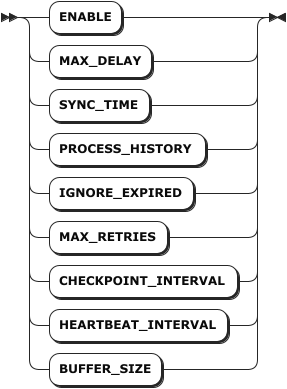
stream_query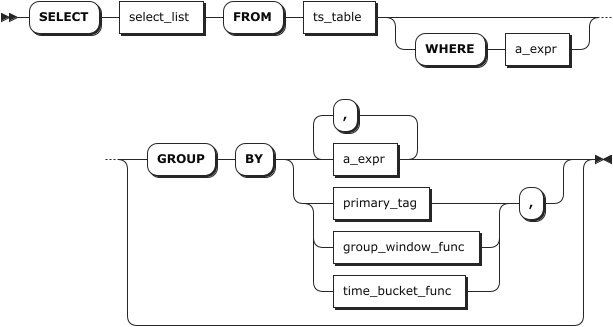
Parameters
| Parameter | Description |
|---|---|
stream_name | The name of the stream to create. |
table_name | The name of the target table. Note The schema of the target table must be compatible with the select_list option of the stream_query parameter. |
stream_option | The stream parameters. Available options: - ENABLE: Configure whether to enable the stream. Available options are on and off. on indicates enabling a stream while off indicates disabling a stream. By default, it is set to on. - MAX_DELAY: The maximum duration for the aggregate window. By default, it is set to 24h. The supported units for the MAX_DELAY parameter include millisecond (ms), second (s), minute (m), hour (h), day (d), and week (w). - SYNC_TIME: The maximum allowed out-of-order data window. By default, it is set to 1m. The value of the SYNC_TIME parameter must be smaller than the value of the MAX_DELAY parameter. - PROCESS_HISTORY: Configure whether to deal with historical data and pending data. Available options are on and off. on indicates dealing with historical data and pending data while off indicates not dealing with historical data and pending data. By default, it is set to off. - MAX_RETRIES: The maximum retry times after a stream encounters an error. By default, it is set to 5. - CHECKPOINT_INTERVAL: The checkpoint period of the stream. By default, it is set to 10s. The value of the CHECKPOINT_INTERVAL parameter must be smaller than the value of the SYNC_TIME parameter. - HEARTBEAT_INTERVAL: The heartbeat period of the stream. By default, it is set to 2s. - BUFFER_SIZE: The buffer size for the stream to perform aggregate computing. By default, it is set to 2Gb. This parameter is not available for a common stream query. Note Currently, KWDB only supports modifying the ENABLE parameter online. To modify other stream parameters, you need to stop the stream first and then make changes. |
value | The values of stream parameters. |
stream_query | The SELECT query statement. Note - The select_list parameter must be compatible with the schema of the target table. - The select_list parameter must contain the first(ts) and last(ts) and take them as the first two output columns, which are used to record the begin time and end time of the window. Otherwise, the system cannot deal with historical data, expired data, and pending data. - Support window functions ( SESSION_WINDOW, STATE_WINDOW, TIME_WINDOW, EVENT_WINDOW, and COUNT_WINDOW) and the Timebucketfunction. The window functions must be used with the GROUP BY clause, and grouping columns must precede the window function. - Support renaming all output columns using the AS clause. - When creating a stream using the TIME_WINDOW function, you must use the first_row and last_row functions to get the begin time and end time of the aggregate window. - When creating a stream using the TIME_WINDOW with a sliding window, you must use the first and last functions to get the begin time and end time of the aggregate window and record them as the first output columns of the target table. |
Examples
This example creates a stream named cpu_stream.
CREATE STREAM cpu_stream INTO cpu_avg AS SELECT first(ts_timestamp), last(ts_timestamp), count(*), avg(usage_user), avg(usage_system), hostname FROM benchmark.cpu GROUP BY TIME_WINDOW(ts_timestamp, '1m', '30s'), hostname;
SHOW STREAMS
The SHOW STREAMS or SHOW STREAM statement lists details about all streams or a specified stream, including the stream name, the target table name, the stream parameters, the time to create the stream, the creator, the current status, the begin time, the end time, and the error messages if any.
- Current status: Whether the stream is enabled or disabled.
- Begin time: The last time when the stream is started. If not started yet, it is kept empty.
- End time: The last time when the stream is stopped. By default, it is kept empty.
- Error message: The reason why the stream fails.
Privileges
N/A
Syntax

Parameters
| Parameter | Description |
|---|---|
stream_name | The name of the stream to view. |
Responses
| Field | Description |
|---|---|
name | The name of the stream. The stream name must be unique within the database. |
target_table_name | The name of the target time-series table to create a stream for. |
options | The parameters of the stream. |
query | The SELECT statement used by the stream. |
status | Whether the stream is enabled or not. |
create_at | The time when the stream is created. |
create_by | The creator of the stream. |
start_time | The last time to start the stream. If not started yet, it is kept empty. |
end_time | The last time to stop the stream. By default, it is kept empty. |
error_message | The error message for a stream failure. |
Examples
This example lists details of the test_stream stream.
SHOW STREAM test_stream;
If you succeed, you should see an output similar to the following:
     name     |       target_table_name       |                                                                                                                      options                                                                                                                       |                        query                         | status  |            create_at             | create_by |        start_time         |         end_time          |                                                                     error_message
--------------+-------------------------------+----------------------------------------------------------------------------------------------------------------------------------------------------------------------------------------------------------------------------------------------------+------------------------------------------------------+---------+----------------------------------+-----------+---------------------------+---------------------------+---------------------------------------------------------------------------------------------------------------------------------------------------------
  test_stream | tsdb.public.ts_test_stream_02 | {"enable":"on","max_delay":"24h","sync_time":"1m","process_history":"off","ignore_expired":"on","ignore_update":"on","max_retries":"5","checkpoint_interval":"10s","heartbeat_interval":"2s","recalculate_delay_rounds":"10","buffer_size":"2GiB"} | SELECT * FROM tsdb.public.ts_test_stream WHERE 1 = 1 | Disable | 2025-08-19 08:25:06.940759+00:00 | root      | 2025-08-19 08:25:06+00:00 | 2025-08-19 08:27:11+00:00 | initial connection heartbeat failed: operation "rpc heartbeat" timed out after 6s: rpc error: code = DeadlineExceeded desc = context deadline exceeded
(1 row)
ALTER STREAM
The ALTER STREAM statement modifies parameters of a stream.
Privileges
The user must be a member of the admin role or the creator of the stream. By default, the root user belongs to the admin role.
Note
If the user who created a stream is removed, only the admin role can remove the specified stream.
Syntax

Parameters
| Parameter | Description |
|---|---|
stream_name | The name of the stream to modify. |
stream_option | The stream parameters to modify. Available options: - ENABLE: Configure whether to enable the stream. Available options are on and off. on indicates enabling a stream while off indicates disabling a stream. By default, it is set to on. - MAX_DELAY: The maximum duration for the aggregate window. By default, it is set to 24h. The supported units for the MAX_DELAY parameter include millisecond (ms), second (s), minute (m), hour (h), day (d), and week (w). - SYNC_TIME: The maximum allowed out-of-order data window. By default, it is set to 1m. The value of the SYNC_TIME parameter must be smaller than the value of the MAX_DELAY parameter. - PROCESS_HISTORY: Configure whether to deal with historical data and pending data. Available options are on and off. on indicates dealing with historical data and pending data while off indicates not dealing with historical data and pending data. By default, it is set to off. - MAX_RETRIES: The maximum retry times after a stream encounters an error. By default, it is set to 5. - CHECKPOINT_INTERVAL: The checkpoint period of the stream. By default, it is set to 10s. The value of the CHECKPOINT_INTERVAL parameter must be smaller than the value of the SYNC_TIME parameter. - HEARTBEAT_INTERVAL: The heartbeat period of the stream. By default, it is set to 2s. - BUFFER_SIZE: The buffer size for the stream to perform aggregate computing. By default, it is set to 2Gb. This parameter is not available for a common stream query. Note - Currently, KWDB only supports modifying the ENABLE parameter online. To modify other stream parameters, you need to stop the stream first and then make changes. - When you resume a stopped stream, the system checks whether there is any pending data and uses the minimum data feed watermark to compute the volume of pending data. If there is any pending data, the system gets and deals with historical data synchronously and then deals with real-time data. If there is any window function, when receiving data sent in the first window function, the system asynchronously deals with historical data and the data that are not dealt before the first real-time data window. |
value | The values of stream parameters. |
Examples
This example stops a stream named cpu_stream.
-- Stop a stream.
ALTER STREAM cpu_stream SET OPTIONS(enable = 'off');
You can also use the ALTER STREAM <name> SET <stream_option> = '<value>' format to modify stream parameters. This example stops a stream named cpu_stream.
-- Stop a stream.
ALTER STREAM cpu_stream SET enable = 'off';
DROP STREAM
The DROP STREAM statement removes a stream. If the target stream is running, the stream cannot be removed untill it is completed.
Privileges
The user must be a member of the admin role or the creator of the stream. By default, the root user belongs to the admin role.
Note
If the user who created a stream is removed, only the admin role can remove the specified stream.
Syntax

Parameters
| Parameter | Description |
|---|---|
IF EXISTS | Optional. - When the IF EXISTS keyword is used, the system removes the stream only if the stream has already existed. Otherwise, the system fails to remove the stream without returning an error. - When the IF EXISTS keyword is not used, the system removes the stream only if the stream has already existed. Otherwise, the system fails to remove the stream and returns an error. |
stream_name | The name of the stream to remove. |
Examples
This example removes a stream named cpu_stream.
DROP STREAM cpu_stream;