SELECT
The simple SELECT clause is the main SQL syntax to read and process existing data. When used as a standalone statement, the simple SELECT clause is also called the SELECT statement. However, it is also a selection clause that can be combined with other constructs to form more complex queries. KWDB supports configuring the maximum number of returned rows of the SQL query results using the SET CLUSTER SETTING sql.auto_limit.quantity = <value> command.
KWDB supports addition and subtraction operations of time in queries for timestamp-typed columns or timestamp constants, and for functions and expressions whose result is timestamp. KWDB supports comparing the operation results using the greater than sign (>), the less than sign (<), the equals sign (=), the greater than or equal to sign (>=), and the less than or equal to sign (<=). The addition and subtraction operations can include the interval constant, other timestamp-typed columns, and the functions and expressions whose result is interval, timestamp, or timestamptz. If both sides of the operator are timestamp-typed or timestamptz-typed columns, only subtraction is supported.
In addition and subtraction operations, the supported units for the interval constant include microsecond (us), millisecond (ms), second (s), minute (m), hour (h), day (d), week (w), month (mon), and year (y). Currently, KWDB does not support composite time formats, such as 1d1h.
The valid ranges for millisecond, second, minute, and hour are constrained by the maximum value of nanosecond (INT64). The table below specifies the supported value ranges:
| Unit | Range |
|---|---|
| Microsecond (us) | [-62,167,219,200,000, 31,556,995,200,000] |
| Millisecond (ms) | [-62,167,219,200,000, 31,556,995,200,000] |
| Second (s) | [-9,223,372,036, 9,223,372,036] |
| Minute (m) | [-153,722,867, 153,722,867] |
| Hour (h) | [-2,562,047, 2,562,047] |
The valid ranges for day, week, month, and year are constrained by the results of addition and subtraction operations, whose corresponding number of microseconds must not exceed the range of INT64.
Note
KWDB supports using the addition and subtraction operations of time in the following cases:
SELECTlist: such asSELECT ts+1h FROM table1;, which means to return the results based on the specified time (the column's timestamp + one hour).WHEREclause: such asSELECT * FROM table1 WHERE ts+1h > now();, which means to return the results whose specified time (the column's timestamp + one hour) is greater than the current time.ORDER BYclause: such asSELECT * FROM table1 ORDER BY ts+1h;, which means to sort columns based on the specified time (the column's timestamp + one hour).HAVINGclause: such asSELECT MAX(ts) FROM table1 GROUP BY ts HAVING ts+1h > now();, which means to filter the qualified grouped results.- Recall functions whose parameter type is set to timestamp: such as
SELECT CAST(ts+1h AS timestamp) FROM table1;, which means to convert the results based on the specified time (the column's timestamp + one hour) into timestamp-typed values. - Use comparison operations to indicate the join condition: such as
SELECT * FROM table1,table2 WHERE table1.ts+1h > table2.ts;, which means to use the addition and subscription operations when joining two tables.
Privileges
The user must be a member of the admin role or have been granted the SELECT privilege on the specified table(s).
Syntax
Simple query
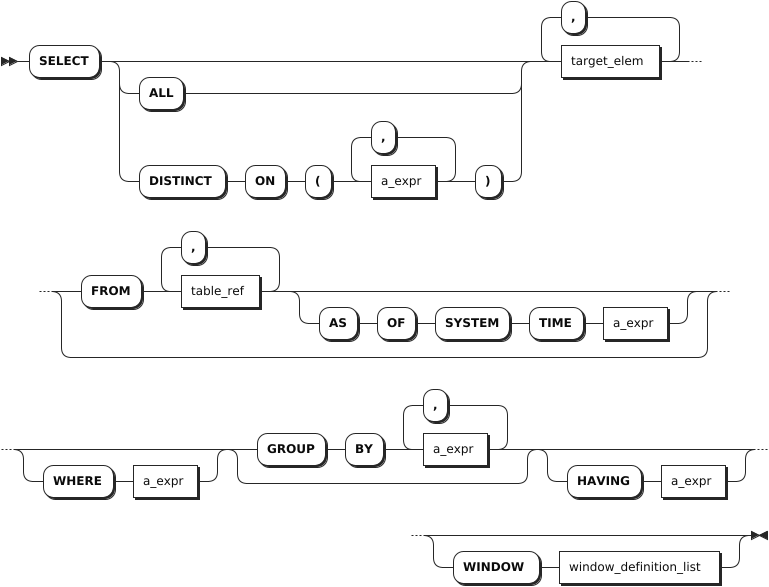
target_elem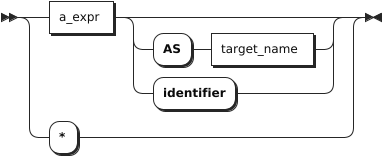
table_ref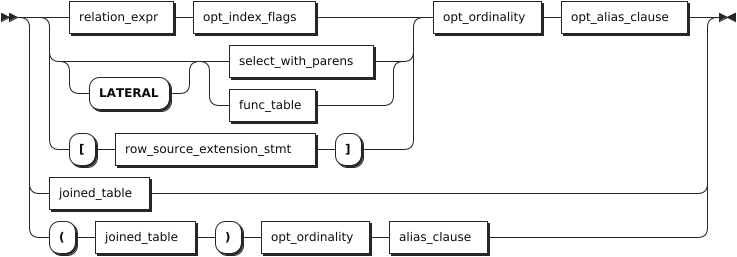
a_expr
window_definition
Complex query
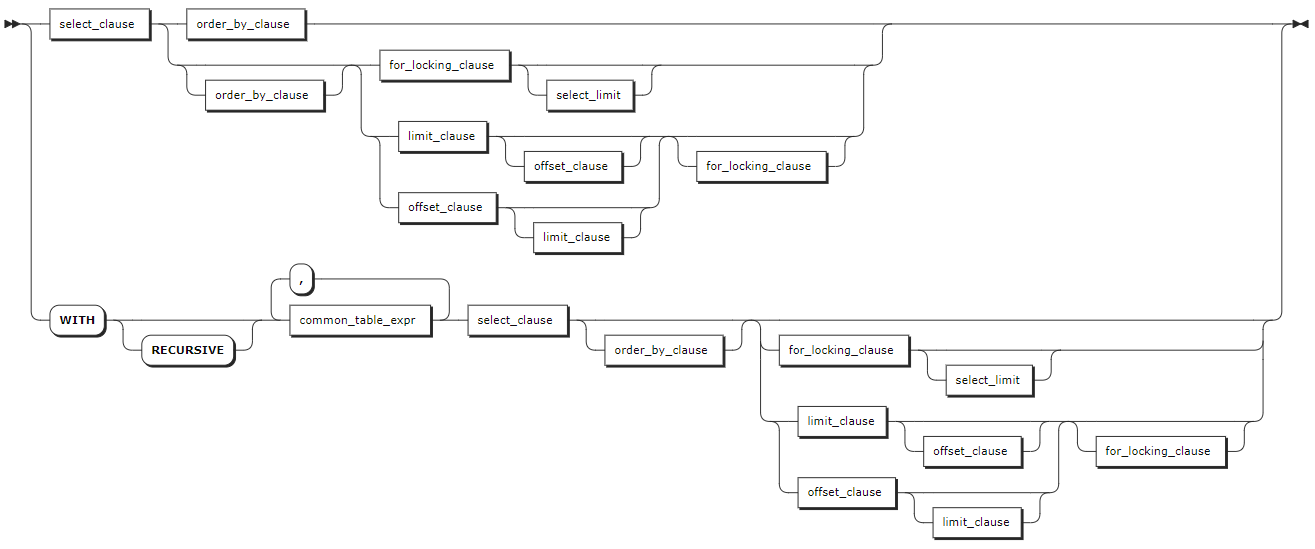
select_clause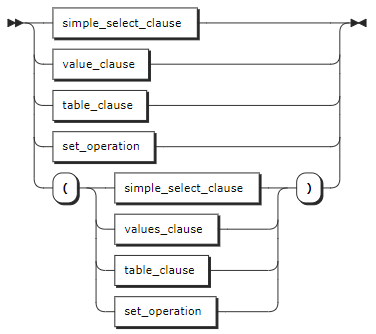
ordedr_by_clause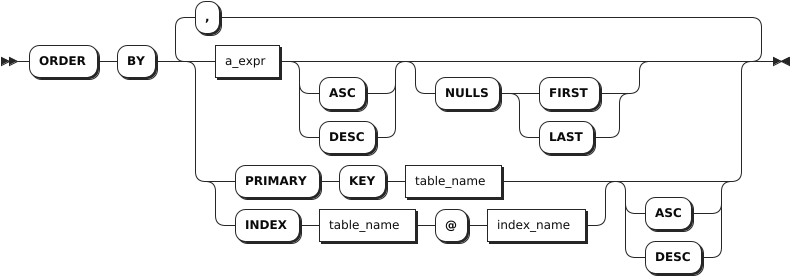
for_locking_clause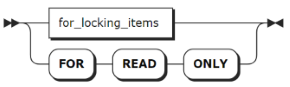
limit_clause
offset_clause
Parameters
Simple query
Parameter Description DISTINCTorALLBy default, or when ALLis specified, theSELECTstatement returns all the selected rows, without removing duplicate rows. WhenDISTINCTis specified, duplicate rows are eliminated.DISTINCT ON ( a_expr [, ...] )a_expr[,…]is a list of scalar expressions within parentheses.
- WithoutON, two rows are considered duplicate rows if they are equal on all the results computed bySELECT.
- WithON, two rows are considered duplicate rows if they are equal only using the scalar expressions listed withON. When two rows are considered duplicate rows according toDISTINCT ON, the values of the first row in theFROMclause in the order specified byORDER BYare used to compute the remaining target expressions. IfORDER BYis not specified, KWDB will pick any one of the duplicate rows as first row, non-deterministically.target_elemIt can be a scalar expression or *.
- A scalar expression: compute a column in each result row.
-*: automatically retrieve all columns from theFROMclause.
Iftarget_elemcontains an aggregate function, aGROUP BYclause can be used to further control the aggregation.table_refThe table expression to retrieve data from. Using two or more table expressions in the FROMclause, separated with a comma, is equivalent to a CROSS JOIN expression. For details about CROSS JOIN, see Cross-model Query.AS OF SYSTEM TIMERetrieve data as it existed as of timestamp.
Note
BecauseAS OF SYSTEM TIMEreturns historical data, your reads might be stale.WHERE a_exprThe filtering statement for the SELECTstatement, which is used to select rows that returnTRUE.a_exprmust be an expression that returns Boolean values using columns (e.g.,<column> = <value>).ROWNUMis a sequence starting from1. The system filters each rows based on conditions. If no condition is met, theROWNUMis not automatically incremented. If met, theROWNUMis automatically incremented by1.
Tip
When there are multiple subqueries and logical operators (AND, OR) in theWHEREclause and there some semantic errors in some subqueries, the system returns an error when executing a query, sayinginternal error: invalid index.GROUP BY + a_exprThe system uses the GROUP BYclause to divide a data set into multiple small areas based on some rules (defined usinga_expr) and then deals with data in these small areas. When an aggregate function followsSELECTas atarget_elem, orHAVINGas ana_expr, you can create aggregate groups on column groupings listed afterGROUP BY. When using an aggregate function andGROUP BYclause in a query, avoid an oversized result set listed after theGROUP BY.HAVING + a_exprWhen not working with the WHEREclause, theHAVINGclause is used to filer grouped data. Normally, theHAVINGclause works with theGROUP BYclause to only retrieve aggregate function groups that returnTRUEfora_expr.a_exprmust be an expression that returns Boolean values using columns (e.g.,<column> = <value>). TheHAVINGclause works like theWHEREclause, but for aggregate functions.WINDOW window_definition_listA list of window definitions. Available options are:
-window_name: the name of the new window frame.
-opt_existing_window_name: an optional name of an existing window frame, defined in a different window definition.
-opt_sort_clause: an optionalORDER BYclause.
-opt_frame_clause: an optional frame clause, which contains a frame boundary and/or anEXCLUDEclause.Complex query
Parameter Description SELECTclauseThe SELECTclause supports any of the following forms:
-simple_SELECT_clause: simpleSELECTclause
-values_clause:VALUESclause
-table_clause: table clause
-set_operation: set operationsORDER BYThe ORDER BYclause takes a comma-separated list of ordering specifications. Each ordering specification is composed of a column selection followed optionally by the keywordASCorDESC. TheORDERspecifications can take any of the following forms:
-a_expr: an arbitrary scalar expression. This uses the result of evaluating that expression as the sorting key.
-PRIMARY KEY+table_name: use the primary key column(s) of the given table as the sorting key. This table must be part of the data source.
-INDEX+table_name+@+index_name: uses the columns indexed by the given index as the sorting key. This table must be part of the data source.
- OptionalASCandDESCkeywords: they are used to specify the order. By default, it is set toASC. TheASCkeyword indicates to use the sorting key as-is. TheDESCkeyword indicates to invert the direction of the column(s).FOR LOCKINGclauseOrder transactions by controlling concurrent access to one or more rows. LIMITclauseYou can use the LIMIT + countformat to retrieve the specified number of rows. KWDB also supports configuring the maximum number of returned rows of the SQL query results using thesql.auto_limit.quantitycluster parameter. But the priority of theLIMITclause is higher than that of thesql.auto_limit.quantitycluster parameter.OFFSETclauseThe OFFSETclause instructs the operation to skip a specified number of rows. It is often used withLIMITto paginate through retrieved rows. To limit the size of the result set and skip some rows of the initial result set, you can use theOFFSETclause to get the next part of the result set. In general, theOFFSETclause is used to paginate large tables to avoid retrieving the full table.
Examples
These examples assume that you have created a table and inserted data into the table.
-- 1. Create a table named accounts.

CREATE TABLE accounts(id INT8 DEFAULT unique_rowid() PRIMARY KEY, name STRING, balance DECIMAL, enabled BOOL);
CREATE TABLE

-- 2. Insert data into the table.

INSERT INTO accounts VALUES (1, 'lily', 10000.5, true), (2, 'ruarc', 20000.75, true), (3, 'tullia', 30000, false), (4, 'arturo', 45000, false);
INSERT 4
Retrieve specific columns.
SELECT id FROM accounts WHERE balance < 21000;
id
--
1
2
(2 rows)
Retrieve all columns.
SELECT * FROM accounts;
id|name  |balance |enabled
--+------+--------+-------
1 |lily  |10000.5 |t
2 |ruarc |20000.75|t
3 |tullia|30000   |f
4 |arturo|45000   |f
(4 rows)
Filter the table on a single condition.
SELECT id FROM accounts WHERE balance < 21000;
id
--
1
2
(2 rows)
Filter the table on multiple conditions.
SELECT * FROM accounts WHERE balance > 25000 AND enabled = false;
id|name  |balance|enabled
--+------+-------+-------
3 |tullia|30000  |f
4 |arturo|45000  |f
(2 rows)
Use the
DISTINCTkeyword to remove all but one instance of duplicate values from your retrieved data.SELECT DISTINCT name FROM accounts WHERE enabled=true; name ----- lily ruarc (2 rows)Use the
WHERE <column> IN (<a comma-separated list of values>)clause to filter the table.SELECT name FROM accounts WHERE balance in (10000.5, 20000.75); name ----- lily ruarc (2 rows)Use the
ASkeyword to rename a column's name in output.SELECT name AS n, balance FROM accounts WHERE enabled=true; n |balance -----+-------- lily |10000.5 ruarc|20000.75 lily |50000.5 (3 rows)Search for string values.
Search for partial string that matches in columns using
LIKE, which supports the following wildcard operators:%: match0or multiple characters._: match exactly1character.[charlist]: match any character listed incharlist.charlistor[!charlist]: do not match any character listed incharlist.
SELECT * FROM accounts WHERE name LIKE '%li%';
id|name  |balance|enabled
--+------+-------+-------
1 |lily  |10000.5|t
3 |tullia|30000  |f
5 |lily  |50000.5|t
(3 rows)
Use aggregate functions to perform computation on retrieved rows.
SELECT MIN(balance) FROM accounts;
min
-------
10000.5
(1 row)
KWDB supports using the retrieved value as part of the
WHEREclause expression.SELECT id, name, balance FROM accounts WHERE balance = (SELECT MIN(balance) FROM accounts); id|name|balance --+----+------- 1 |lily|10000.5 (1 row)Perform aggregate function on retrieved rows.
SELECT SUM(balance) FROM accounts WHERE enabled=true;
SUM
--------
80001.75
(1 row)
Use
FILTER (WHERE <Boolean expression>)to filter columns fed into aggregate functions. Data that returnFALSEorNULLfor theFILTERclause's Boolean expression are not fed into the aggregate function.SELECT count(*) AS unfiltered, count(*) FILTER (WHERE balance > 15000) AS filtered FROM accounts; unfiltered|filtered ----------+-------- 5 |4 (1 row)Split the retrieved rows into groups and then perform the aggregate function on each of them.
SELECT enabled AS state, SUM(balance) AS state_balance FROM accounts GROUP BY enabled;
state|state_balance
-----+-------------
t    |80001.75
f    |75000
(2 rows)
Use the
HAVINGclause to filter aggregate groups.SELECT enabled AS state, SUM(balance) AS state_balance FROM accounts GROUP BY enabled HAVING AVG(balance) between 100 AND 30000; state|state_balance -----+------------- t |80001.75 (1 row)Use aggregate functions in the
HAVINGclause.SELECT name, enabled FROM accounts WHERE enabled = true GROUP BY name, enabled HAVING count(name) > 1; name|enabled ----+------- lily|t (1 row)Query tables using the
LIMIT+countform.SELECT * FROM accounts LIMIT 5; id|name |balance |enabled --+------+--------+------- 1 |lily |10000.5 |t 2 |ruarc |20000.75|t 3 |tullia|30000 |f 4 |arturo|45000 |f 5 |lily |50000.5 |t (5 rows)Query tables using the
FETCH FIRST+countform.SELECT * FROM accounts FETCH FIRST 2 ROW ONLY; id|name |balance |enabled --+-----+--------+------- 1 |lily |10000.5 |t 2 |ruarc|20000.75|t (2 rows)Query tables using the
LIMITandOFFSETclauses.SELECT id, name FROM accounts LIMIT 1 OFFSET 1; id | name -----+----------- 2 | Zhang San (1 row)Query tables using the
OFFSETandNEXTkeywords.SELECT * FROM accounts OFFSET 2 rows FETCH NEXT 2 ROW ONLY; id | name | balance | enabled -----+---------+---------+---------- 3 | Zhao Si | 30000 | false 4 | Wang Wu | 45000 | false (2 rows)