Transactions
Note
- KWDB supports querying or inserting time-series data within explicit transactions but does not ensure the transactionality of the time-series engine or the consistency of the cross-model query results.
- KWDB does not support performing DDL operations on time-series data within explicit transactions.
KWDB supports bundling multiple SQL statements into a single all-or-nothing transaction. If a transaction succeeds, all mutations are applied together with virtual simultaneity. If any part of a transaction fails, the entire transaction is aborted, and the database is left unchanged.
The transaction guarantees ACID semantics:
- A (Atomicity): all SQL statements are executed as an atomic transaction. Either all statements are executed or none of them is executed.
- C (Consistency): after the transactions is completed, the state of all data remains consistent.
- I (Isolation): if multiple transactions are executed, any reads or writes performed on the database will not be impacted by other reads of writes of separate transaction occurring on the same database.
- D (Durability): durability ensures that changes to the database that are successfully committed will survive permanently, even in the case of system failure.
KWDB supports both implicit and explicit transactions, both ensuring data consistency and integrity.
- Implicit transactions are transactions that are automatically created for each operation without using the
BEGINorCOMMITstatement and automatically committed or rollbacked after the operation is completed. Implicit transactions provide more simplified codes and higher development efficiency. Implicit transactions are suitable for signle-statement operations. If an operation succeeds, the system automatically commits the transaction. Otherwise, the system automatically rollbacks the transaction. - Explicit transactions are transactions that are specified by the
BEGINorCOMMITstatement in an application. Explicit transactions provide more granular control over multi-statement operations. After the operation are completed, you need to manually commit or rollback the transactions.
Isolation Levels
When two concurrent transactions operate on the same record, issues like dirty reads, non-repeatable reads, and phantom reads may arise due to inconsistent data states. As a core component of ACID compliance, isolation governs how concurrency is managed to ensure consistency. KWDB supports three isolation levels:
- Serializable: Serializable isolation is the highest isolation level and ensures that concurrent transactions produce the same result as if executed sequentially. This prevents all exceptions allowed by weaker isolation levels and thus ensures data correctness. By default, KWDB provides Serializable isolation.
- Read Committed (RC): at the RC isolation level, a transaction reads data that has been committed by other transactions, but serializability of the transaction is not fully guaranteed. RC isolation permits some concurrency anomalies including unrepeatable reads, phantom reads, lost updates, and write skew, in exchange for minimizing transaction abortions, retries, and blocking. RC isolation doES not return serialization errors that require client-side handling. The RC isolation is appropriate in the following scenarios:
- Your application needs to maintain a high workload concurrency with minimal transaction retries, and it can tolerate potential concurrency anomalies. Predictable query performance at high concurrency is more valuable than guaranteed transaction serializability.
- You are migrating an application to KWDB that is built at a RC isolation level on the source database, and it is not feasible to modify your application to use Serializable isolation.
- Repeatable Read (RR): the RR isolation ensures that when the same data is read multiple times within the same transaction, the results are consistent. To accomplish this, when a transaction executes a query, it locks the columns or rows of the query to ensure that no other transaction can modify the data in the meantime. RR isolation solves issues like dirty reads, unrepeatable reads.
By default, KWDB uses the Serializable isolation level.
Configure Isolation Levels
KWDB supports configuring cluster-level, session-level, and transaction-level isolation levels, where the transaction-level isolation levels are of the highest priority, and the cluster-level isolation levels are of the lowest priority.
Configure Cluster-level Isolation Levels
The cluster-level isolation level settings take effect only for subsequently initiated connections. For details, see Cluster Settings. You can use the SHOW CLUSTER SETTING sql.txn.cluster_transaction_isolation statement to view cluster-level isolation level settings.
SET CLUSTER SETTING sql.txn.cluster_transaction_isolation = <level>;
Values for the level parameter:
serializable: (default), Serializable isolationread committed: RC isolationrepeatable read: RR isolation
Configure Session-level Isolation Levels
The session-level isolation level settings take effect only for the current connection. If no isolation level is specified when initiating a session, the system will use the cluster-level isolation level settings. You can use the following command to change the session-level isolation level settings. After update, you can use the SHOW default_transaction_isolation statement to view session-level isolation level settings.
SET default_transaction_isolation = <level>;
Values for the level parameter:
serializable: (default), Serializable isolationread committed: RC isolationrepeatable read: RR isolation
Configure Transaction-level Isolation Levels
If no isolation level is specified when initiating a transaction, the system will use the session-level isolation level settings. You can use the following command to change the transaction-level isolation level settings. After update, you can use the SHOW transaction isolation level statement to view transaction-level isolation level settings.
Note
KWDB only supports changes the isolation level settings within explicit transactions that do not execute kv operations (read and write operations).
Configure the transaction-level isolation level using the
BEGIN TRANSACTION ISOLATION LEVELstatement.BEGIN TRANSACTION ISOLATION LEVEL <iso_level>;Values for the
iso_levelparameter:SERIALIZABLE: (default), Serializable isolationREAD COMMITTED: RC isolationREPEATABLE READ: RR isolation
Configure the transaction-level isolation level using the
SET TRANSACTION ISOLATION LEVELstatement.BEGIN; -- Initiate a transaction. SET TRANSACTION ISOLATION LEVEL <iso_level>; -- Set the isolation level within an explicit transaction.Values for the
iso_levelparameter:SERIALIZABLE: (default), Serializable isolationREAD COMMITTED: RC isolationREPEATABLE READ: RR isolation
Configure the transaction-level isolation level using the
transaction_isolationsession variable.BEGIN; -- Initiate a transaction. SET transaction_isolation = <level>; -- Set the isolation level within an explicit transaction.Values for the
levelparameter:serializable: (default), Serializable isolationread committed: RC isolationrepeatable read: RR isolation
Configure the transaction-level isolation level using the
SET SESSION TRANSACTION ISOLATION LEVELstatement.BEGIN; -- Initiate a transaction. SET SESSION TRANSACTION ISOLATION LEVEL <iso_level>; -- Set the isolation level within an explicit transaction.Values for the
levelparameter:serializable: (default), Serializable isolationread committed: RC isolationrepeatable read: RR isolation
SQL Statements
BEGIN
The BEGIN statement initiates a transaction, which either successfully executes all of the statements it contains or none at all. In KWDB, the following are aliases for the BEGIN statement:
BEGIN TRANSACTIONSTART TRANSACTION
Privileges
No privileges are required to initiate a transaction. However, privileges are required for each statement within a transaction.
Syntax
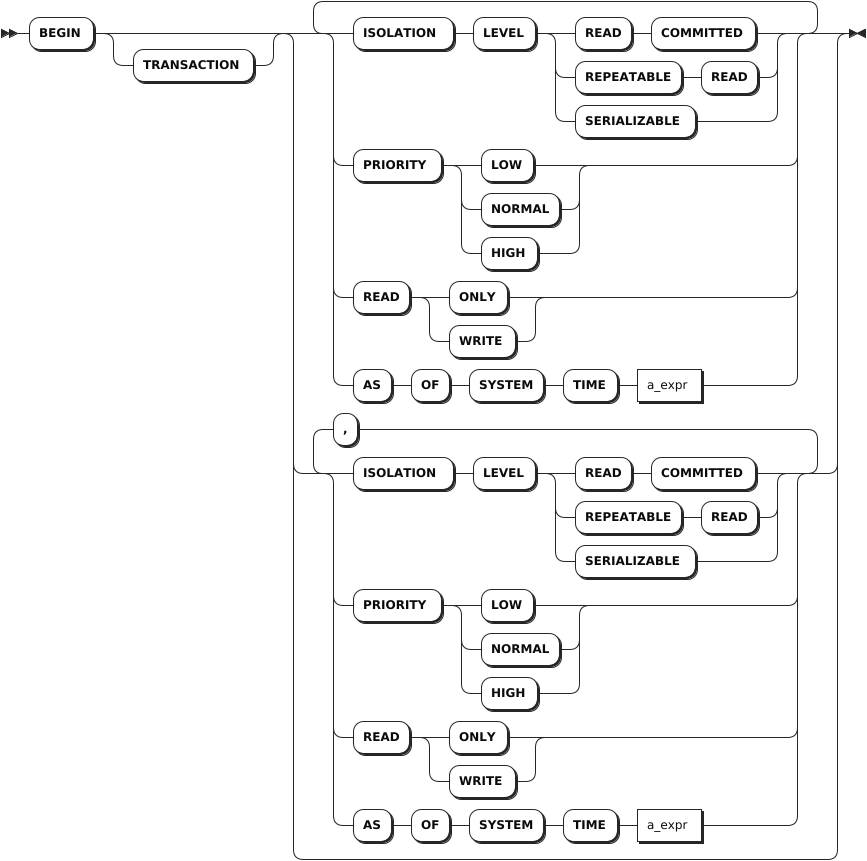
Parameters
| Parameter | Description |
|---|---|
ISOLATION LEVEL | The isolation level of the transaction. Available options: - Serializable: Serializable isolation is the strongest of the four transaction isolation levels defined by the SQL standard. Serializable isolation guarantees that even though transactions may execute in parallel, the result is the same as if they had executed one at a time, without any concurrency. - Read Committed (RC): RC isolation guarantees a transaction to read data that has been committed by other transactions but does not guarantee the serializability of the transaction's operations. - Repeatable Read (RR): RR isolation guarantees that when the same data is read multiple times within the same transaction, the results are consistent. |
PRIORITY | The priority of the transaction. By default, it is set to NORMAL. You can set it to LOW or HIGH as required. Transactions with higher priority are less likely to need to be retried. |
READ | The access mode of the transaction. Available options are READ ONLY and READ WRITE. By default, it is set to READ WRITE. You can set the access mode using the transaction_read_only session variable. |
AS OF SYSTEM TIME | Execute the transaction using the "as of" timestamp. The AS OF SYSTEM TIME clause can be used only when the access mode is set to READ ONLY. If the transaction contains any writes, or if the READ WRITE access mode is specified, the system returns an error. |
Examples
These examples assume that you have created three tables (accounts, orders, customers) and inserted data into these tables.
Initiate a transaction using default settings.
By default, the isolation level is set to
SERIALIZABLEand the priority is set toNORMAL.-- 1. Initiate a transaction. BEGIN; Now adding input for a multi-line SQL transaction client-side (smart_prompt enabled). Press Enter two times to send the SQL text collected so far to the server, or Ctrl+C to cancel. You can also use \show to display the statements entered so far. -- 2. Create a savepiont. SAVEPOINT foo; -- 3. Update the accounts table. UPDATE accounts SET balance = 5000.0 WHERE id = 2; -- 4. Insert data into the accounts table. INSERT INTO accounts (id, balance) VALUES (9, DEFAULT); -- 5. Commit the transaction. COMMIT; COMMITInitiate a transaction and set the isolation level to
read committed.Note
You can also use the
SET TRANSACTIONstatement to set the isolation level for a transaction. For details, see SET TRANSACTION.-- 1.-- Set the isolation level using an explicit transaction. BEGIN TRANSACTION ISOLATION LEVEL read committed; -- 2. Commit the transaction. COMMIT; COMMITInitiate a transaction and set the priority to
HIGH.Note
You can also use the
SET TRANSACTIONstatement to set the priority for a transaction. For details, see SET TRANSACTION.-- 1. Initiate a transaction. BEGIN PRIORITY HIGH; Now adding input for a multi-line SQL transaction client-side (smart_prompt enabled). Press Enter two times to send the SQL text collected so far to the server, or Ctrl+C to cancel. You can also use \show to display the statements entered so far. -- 2. Commit the transaction. COMMIT; COMMITInitiate a transaction using the "as of" timestamp.
Note
You can also use the
SET TRANSACTIONstatement to set the "as of" timestamp. For details, see SET TRANSACTION.-- 1. Initiate a transaction. BEGIN AS OF SYSTEM TIME '2023-04-18 10:00:00.0+00:00'; Now adding input for a multi-line SQL transaction client-side (smart_prompt enabled). Press Enter two times to send the SQL text collected so far to the server, or Ctrl+C to cancel. You can also use \show to display the statements entered so far. -- 2. Commit the transaction. COMMIT; COMMITInitiate a transaction with automatic retries.
KWDB will automatically retry all transactions that contain both
BEGINandCOMMITin the same batch. Batching is controlled by your driver or client's behavior, but means that KWDB receives all of the statements as a single unit, instead of a number of requests. From the perspective of KWDB, a transaction sent as a batch looks like this:-- 1. Initiate a transaction. BEGIN; Now adding input for a multi-line SQL transaction client-side (smart_prompt enabled). Press Enter two times to send the SQL text collected so far to the server, or Ctrl+C to cancel. You can also use \show to display the statements entered so far. -- 2. Remove data whose id field is set to 1 from the customers table. DELETE FROM customers WHERE id = 1; DELETE -- 3. Remove data whose customer field is set to 1 from the orders table. DELETE orders WHERE customer = 1; DELETE 1 -- 4. Commit the transaction. COMMIT;In your application's code, batched transactions are often just multiple statements sent at once. In this example, this transaction would send multiple statements as a single batch and automatically retry:
db.Exec(
  "BEGIN;

  DELETE FROM customers WHERE id = 1;

  DELETE orders WHERE customer = 1;

  COMMIT;"
)
SET TRANSACTION
The SET TRANSACTION statement sets the transaction priority, access mode, "as of" timestamp, and isolation level.
Privileges
No privileges are required to set the transaction priority. However, privileges are required for each statement within a transaction.
Syntax

Parameters
| Parameter | Description |
|---|---|
ISOLATION LEVEL | The isolation level of the transaction. Available options: - Serializable: Serializable isolation is the strongest of the four transaction isolation levels defined by the SQL standard. Serializable isolation guarantees that even though transactions may execute in parallel, the result is the same as if they had executed one at a time, without any concurrency. - Read Committed (RC): RC isolation guarantees a transaction to read data that has been committed by other transactions but does not guarantee the serializability of the transaction's operations. - Repeatable Read (RR): RR isolation guarantees that when the same data is read multiple times within the same transaction, the results are consistent. |
PRIORITY | The priority of the transaction. By default, it is set to NORMAL. You can set it to LOW or HIGH as required. Transactions with higher priority are less likely to need to be retried. |
READ | The access mode of the transaction. Available options are READ ONLY and READ WRITE. By default, it is set to READ WRITE. You can set the access mode using the transaction_read_only session variable. |
AS OF SYSTEM TIME | Execute the transaction using the "as of" timestamp. The AS OF SYSTEM TIME clause can be used only when the access mode is set to READ ONLY. If the transaction contains any writes, or if the READ WRITE access mode is specified, the system returns an error. |
Examples
Set the isolation level of a transaction.
-- 1. Initiate a transaction.

BEGIN;
Now adding input for a multi-line SQL transaction client-side (smart_prompt enabled).
Press Enter two times to send the SQL text collected so far to the server, or Ctrl+C to cancel.
You can also use \show to display the statements entered so far.

-- 2. Set the isolation level of the transaction to READ COMMITTED.

SET TRANSACTION ISOLATION LEVEL READ COMMITTED;

-- 3. Commit the transaction.

COMMIT;
COMMIT
Set the priority of a transaction.
-- 1. Initiate a transaction.

BEGIN;
Now adding input for a multi-line SQL transaction client-side (smart_prompt enabled).
Press Enter two times to send the SQL text collected so far to the server, or Ctrl+C to cancel.
You can also use \show to display the statements entered so far.

-- 2. Set the priority of the transaction to HIGH.

SET TRANSACTION PRIORITY HIGH;

-- 3. Commit the transaction.

COMMIT;
COMMIT
Set the
AS OF SYSTEM TIMEoption of a transaction.-- 1. Initiate a transaction. BEGIN; Now adding input for a multi-line SQL transaction client-side (smart_prompt enabled). Press Enter two times to send the SQL text collected so far to the server, or Ctrl+C to cancel. You can also use \show to display the statements entered so far. -- 2. Set the AS OF SYSTEM TIME option of the transaction. SET TRANSACTION AS OF SYSTEM TIME '2023-04-18 10:00:00+00:00'; -- 3. Commit the transaction. COMMIT; COMMIT
ROLLBACK
The ROLLBACK statement aborts the current transaction and all of its nested transactions, discarding all transactional updates made by statements included in the transaction.
Privileges
No privileges are required to rollback a transaction. However, privileges are required for each statement within a transaction.
Syntax

Parameters
| Parameter | Description |
|---|---|
savepoint_name | The name of the savepoint. KWDB supports creating savepoints for the following transactions: - Nested transactions: the savepoint name can be any name. - Auto-retry transactions: by default, the savepoint name is set to kwbase_restart. You can define another name as required. To make the user-defined savepoint name take effect, you need to set the force_savepoint_restart session variable to true. Once the setting takes effect, the savepoint name for auto-retry transactions can be any name. |
Examples
Rollback a transaction.
These examples assume that you have created a table named
accountsand inserted data into the table.-- 1. Check data of the table. SELECT * FROM accounts; id | balance -----+---------- 1 | 1000 2 | 2000 3 | 3000 (3 rows) -- 2. Initiate a transaction. BEGIN; Now adding input for a multi-line SQL transaction client-side (smart_prompt enabled). Press Enter two times to send the SQL text collected so far to the server, or Ctrl+C to cancel. You can also use \show to display the statements entered so far. -- 3. Update the accounts table. UPDATE accounts SET balance = 2500 WHERE id = 1; -- 4. Rollback the transaction. ROLLBACK; ROLLBACK -- 5. Check data of the table. SELECT * FROM accounts; id | balance -----+---------- 1 | 1000 2 | 2000 3 | 3000 (3 rows)Retry a transaction.
After enabling transaction retries, when
40001 / retry transactionerror occurs, you can use theROLLBACK TO SAVEPOINTstatement to handle a transaction that needs to be retried.ROLLBACK TO SAVEPOINT kwbase_restart;Perform a multi-level rollback with the
ROLLBACK TO SAVEPOINTstatement.Savepoints can be arbitrarily nested, and rolled back to the outermost level so that every subsequent statement is rolled back.
This example assumes that you have created a table and inserted data into the table. For example, this transaction rollbacks values
(6,6)and(7,7)and only inserts(5,5)into the table.-- 1. Initiate a transaction. BEGIN; -- 2. Insert (5,5) into the table. INSERT INTO kv VALUES (5,5); -- 3. Create a savepoint named foo. SAVEPOINT foo; -- 4. Insert (6,6) into the table. INSERT INTO kv VALUES (6,6); -- 5. Create a savepoint named bar. SAVEPOINT bar; -- 6. Insert (7,7) into the table. INSERT INTO kv VALUES (7,7); -- 7. Release savepoint bar. RELEASE SAVEPOINT bar; -- 8. Rollback to savepoint foo. ROLLBACK TO SAVEPOINT foo; -- 9. Commit the transaction. COMMIT; COMMIT -- 10. Check data of the table. SELECT * FROM kv; k|v -+- 1|1 2|2 3|3 4|4 5|5 (5 rows)Recover from an error in nested transactions with the
ROLLBACK TO SAVEPOINTstatement.If the
ROLLBACK TO SAVEPOINTstatement is used after a database error, it can also cancel the error state of the transaction. Database errors move a nested transaction into an "Aborted" state. In this state, the transaction will not execute any further SQL statements. You can use theROLLBACK TO SAVEPOINTstatement to recover from a logical error in a nested transaction, including:- UNIQUE index error (duplicate row)
- Failed foreign key constraint check (A row does not exist in the referenced table.)
- Mistakes in queries (Reference a column that does not exist.)
-- 1. Initiate a transaction.

BEGIN;

-- 2. Create a savepoint named error1.

SAVEPOINT error1;

-- 3. Insert (5,5) into the table.

INSERT INTO kv VALUES (5,5);
ERROR:  duplicate key value (k)=(5) violates unique CONSTRAINT "primary"

-- 4. Create a savepoint named foo.

SAVEPOINT foo;

-- 6. Check the transaction status.

SHOW TRANSACTION STATUS;
TRANSACTION STATUS
------------------
Aborted
(1 row)

-- 7. Rollback to the savepoint error1.

ROLLBACK TO SAVEPOINT error1;

-- 8. Insert (6,6) into the table.

INSERT INTO kv VALUES (6,6);
INSERT 1

-- 9. Commit the transaction.

COMMIT;

-- 10. Check data of the table.

SELECT * FROM kv;
k|v
-+-
1|1
2|2
3|3
4|4
5|5
6|6
(6 rows)
COMMIT
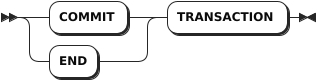
The COMMIT statement commits the current transaction or, when using transaction retries, clears the connection to allow new transactions to begin.
- When using transaction retries, statements issued after the
SAVEPOINTstatement are committed when theRELEASE SAVEPOINTis issued. However, you must still issue aCOMMITstatement to clear the connection for the next transaction. - When not using transaction retries, if statements in the transaction generate any errors, the
COMMITstatement is equivalent toROLLBACK, which aborts the transaction and discards all updates made by its statements.
In KWDB, END is an alias for the COMMIT statement.
Privileges
No privileges are required to commit a transaction. However, privileges are required for each statement within a transaction.
Syntax
Parameters
N/A
Examples
-- 1. Initiate a transaction.

BEGIN;

-- 2. Commit the transaction.

COMMIT;
SAVEPOINT
A savepoint is a marker that defines the beginning of a nested transaction. This marker can be later used to commit or rollback the nested transaction without affecting the progress of the enclosing transaction.
Privileges
No privileges are required to create a savepoint. However, privileges are required for each statement within a transaction.
Syntax

Parameters
| Parameter | Description |
|---|---|
savepoint_name | The name of the savepoint. KWDB supports creating savepoints for the following transactions: - Nested transactions: the savepoint name can be any name. - Auto-retry transactions: by default, the savepoint name is set to kwbase_restart. You can define another name as required. To make the user-defined savepoint name take effect, you need to set the force_savepoint_restart session variable to true. Once the setting takes effect, the savepoint name for auto-retry transactions can be any name. |
Examples
These examples assume that you have created a table named kv.
CREATE TABLE kv (k INT PRIMARY KEY, v INT);
CREATE TABLE
Create a savepoint inside a transaction.
SAVEPOINT foo;Note
Both the
SAVEPOINT fooand theSAVEPOINT Foostatements create a savepoint namedfoo. However, theSAVEPOINT "Foo"statement creates a savepoint namedFoo.Create a savepoint for nested transactions.
Transactions can be nested using savepoint names. The
RELEASE SAVEPOINTandROLLBACK TO SAVEPOINTstatements can both refer to a savepoint higher in the nesting hierarchy. When this occurs, all of the savepoints under the nesting are automatically released or rollbacked.- When a previous savepoint is rollbacked, the statements entered after that savepoint are also rollbacked. For details, see ROLLBACK.
- When a previous savepoint is released, the statements entered after that savepoint are also committed. For details, see RELEASE SAVEPOINT.
Create a savepoint for transaction retries.
A savepoint defined with the name
kwbase_restartis a "retry savepoint" and is used to implement transaction retries.By default, the savepoint name for transaction retries is set to
kwbase_restart. You can set theforce_savepoint_restartsession variable totrueto enable using a custom name for the retry savepoint.-- 1. Initiate a transaction. BEGIN; -- 2. Create the retry savepoint named kwbase_restart. SAVEPOINT kwbase_restart; -- 3. Update the products table. UPDATE products SET inventory = 0 WHERE sku = '8675309'; -- 4. Insert data into the orders table. INSERT INTO orders (customer, sku, status) VALUES (1001, '8675309', 'new'); -- 5. Release the kwbase_restart retry savepoint. RELEASE SAVEPOINT kwbase_restart; -- 6. Commit the transaction. COMMIT;Savepoints and prepared statements.
Prepared statements (
PREPARE/EXECUTE) are not transactional. Therefore, prepared statements are not invalidated upon savepoint rollback. As a result, the prepared statement is saved and executed inside the transaction, despite the rollback to the prior savepoint.-- 1. Initiate a transaction. BEGIN; -- 2. Create a savepoint named foo. SAVEPOINT foo; -- 3. Prepare the statement named bar. PREPARE bar AS SELECT 1; -- 4. Rollback to savepoint foo. ROLLBACK TO SAVEPOINT foo; -- 5. Execute the prepared statement bar. EXECUTE bar; ?column? -------- 1 (1 row) -- 6. Commit the transaction. COMMIT;
RELEASE SAVEPOINT
The RELEASE SAVEPOINT statement commits the nested transaction starting at the corresponding SAVEPOINT statement using the same savepoint name, including all its nested sub-transactions. This further provides support for working with retry savepoints.
Privileges
No privileges are required to release a savepoint. However, privileges are required for each statement within a transaction.
Syntax

Parameters
| Parameter | Description |
|---|---|
savepoint_name | The name of the savepoint. KWDB supports creating savepoints for the following transactions: - Nested transactions: the savepoint name can be any name. - Auto-retry transactions: by default, the savepoint name is set to kwbase_restart. You can define another name as required. To make the user-defined savepoint name take effect, you need to set the force_savepoint_restart session variable to true. Once the setting takes effect, the savepoint name for auto-retry transactions can be any name. |
Handle Errors
The RELEASE SAVEPOINT statement is invalid after the nested transaction has encountered an error. In this case, the following statements can be used:
ROLLBACK TO SAVEPOINT: rollback to the previous savepoint.ROLLBACKorABORT: rollback the entire transaction.COMMIT: commit the entire transaction. In case of error, theCOMMITstatement is equivalent to theROLLBACKorABORTstatement and also rollbacks the entire transaction.
When a transaction or sub-transaction encounters a retry error, the client should repeat the ROLLBACK TO SAVEPOINT statement and the statements in the transaction until the statements complete without error, then issue the RELEASE SAVEPOINT statement.
To completely remove the marker of a nested transaction after it encounters an error and begin other work in the outer transaction, use the ROLLBACK TO SAVEPOINT statement immediately followed by the RELEASE SAVEPOINT statement.
Examples
Confirm whether a savepoint name exists or not.
You cannot view the name of a rollbacked savepoint. In this example, you cannot view the
barsavepoint after the transaction is rollbacked.-- 1. Initiate a transaction. BEGIN; -- 2. Create a savepoint named foo. SAVEPOINT foo; -- 3. Create a savepoint named bar. SAVEPOINT bar; -- 4. Rollback to the foo savepoint. ROLLBACK TO SAVEPOINT foo; -- 5. Release the bar savepoint. RELEASE SAVEPOINT bar; ERROR: savepoint "bar" does not exist -- 6. Commit the transaction. COMMIT;Release a savepoint and commit a transaction.
In this example, the transaction inserts
(2,2)and(4,4)into the table.-- 1. Initiate a transaction. BEGIN; -- 2. Create a savepoint named foo. SAVEPOINT foo; -- 3. Insert (2,2) into the table. INSERT INTO kv VALUES (2,2); -- 4. Insert (4,4) into the table. INSERT INTO kv VALUES (4,4); -- 5. Release the foo savepoint. RELEASE SAVEPOINT foo; -- 6. Commit the transaction. COMMIT; -- 7. Check the data of the table. SELECT * FROM kv; k|v -+- 2|2 4|4 (2 rows)Release a savepoint and commit a nested transaction.
In this example, you will rollback the inner nested transaction (marked by the
lowersavepoint) and commit the outerhighersavepoint.-- 1. Initiate a transaction. BEGIN; -- 2. Create a savepoint named higher. SAVEPOINT higher; -- 3. Update the promo_codes table. UPDATE promo_codes SET rules = jsonb_set(rules, '{value}', '"15%"') WHERE rules @> '{"type": "percent_discount"}'; -- 4. Create a savepoint named lower. SAVEPOINT lower; -- 5. Update the promo_codes table. UPDATE promo_codes SET rules = jsonb_set(rules, '{value}', '"7.5%"') WHERE rules @> '{"type": "percent_discount"}'; -- 6. Rollback to the lower savepoint. ROLLBACK TO SAVEPOINT lower; -- 7. Release the higher savepoint. RELEASE SAVEPOINT higher; -- 8. Commit the transaction. COMMIT;Release a retry savepoint and commit a transaction.
After defining a retry savepoint, you can release the savepoint using the
RELEASE SAVEPOINTstatement and then prepare the connection for the next transaction with theCOMMITstatement.-- 1. Initiate a transaction. BEGIN; -- 2. Create the kwbase_restart retry savepoint. SAVEPOINT kwbase_restart; -- 3. Update the products table. UPDATE products SET inventory = 0 WHERE sku = '8675309'; -- 4. Insert data into the orders table. INSERT INTO orders (customer, sku, status) VALUES (1001, '8675309', 'new'); -- 5. Release the kwbase_restart retry savepoint. RELEASE SAVEPOINT kwbase_restart; -- 6. Commit the transaction. COMMIT;