Role Management
CREATE ROLE
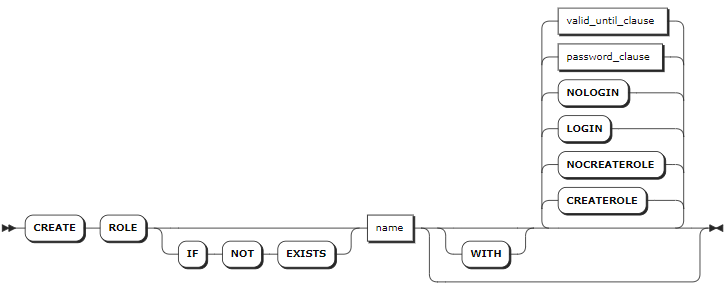
The CREATE ROLE statement creates a role and sets one or more options for the role. Each statement creates only one role. By default, the new role does not support CREATEROLE and LOGIN options.
Privileges
The user must have the CREATEROLE option or be a member of the admin role. By default, the root user belongs to the admin role.
Syntax
password_clause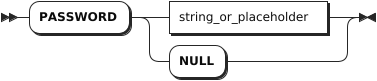
valid_until_clause
Parameters
| Parameter | Description |
|---|---|
IF NOT EXISTS | Optional. - When the IF NOT EXISTS keyword is used, the system creates a new role only if a role of the same name does not already exist. Otherwise, the system fails to create a new role without returning an error. - When the IF NOT EXISTS keyword is not used, the system creates a new role only if a role of the same name does not already existed. Otherwise, the system fails to create a new role and returns an error. |
name | The name of the role to create. The role name is case-insensitive and follows these rules: - Start with a letter or an underscore ( _). - Contain letters, numbers, or underscore ( _). - Must be 1 - 63 characters in length. |
CREATEROLE | Allow the new role to create, change, and drop other non-admin roles. By default, do not set this option when creating a role. |
NOCREATEROLE | Disallow the new role to create, change, and drop other non-admin roles. By default, this option is set when creating a role. |
LOGIN | Allow the new role to log in to the KWDB server. By default, this option is set when creating a role. |
NOLOGIN | Disallow the new role to log in to the KWDB server. By default, do not set this option when creating a role. |
PASSWORD <password> | Set the password for the role. The password can also be set to NULL. The role with this option can access to a secure cluster with the password. The password should be entered as a string literal, enclosed in single quotes (' '). By default, do not set this option when creating a role. |
VALID UNTIL <date_time> | Set the date and time (in the timestamp format) after which the password is not valid. It can also be set to NULL. It is enclosed in single quotes (' '). When you log in to the KWDB database through a CLI tool, you can check the expiration time of the password. By default, do not set this option when creating a role. |
Examples
Create a role with default options. By default, the new role does not support
CREATEROLEandLOGINoptions.-- 1. Create a role named role1. CREATE ROLE role1; CREATE ROLE -- 2. Check role options. SHOW ROLES; username | options | member_of -----------+------------------------------------------------+------------ admin | CREATEROLE | {} role1 | NOLOGIN | {} root | CREATEROLE | {admin} (3 rows)Create a role with the
CREATEROLEoption.-- 1. Create a role named role2 with the CREATEROLE option. CREATE ROLE role2 WITH CREATEROLE; CREATE ROLE -- 2. Check role options. SHOW ROLES; username | options | member_of -----------+------------------------------------------------+------------ admin | CREATEROLE | {} role1 | NOLOGIN | {} role2 | CREATEROLE, NOLOGIN | {} root | CREATEROLE | {admin} (4 rows)Create a role with the
LOGINoption.-- 1. Create a role named role3 with the LOGIN option. CREATE ROLE role3 WITH LOGIN; CREATE ROLE -- 2. Check role options. SHOW ROLES; username | options | member_of -----------+------------------------------------------------+------------ admin | CREATEROLE | {} role1 | NOLOGIN | {} role2 | CREATEROLE, NOLOGIN | {} role3 | | {} root | CREATEROLE | {admin} (5 rows)Create a role and set the password and expiration time for the role.
-- 1. Create a role named role4 and set the password and expiration time for the role.

CREATE ROLE role4 WITH PASSWORD '11aa!!AA' VALID UNTIL '2024-01-01';
CREATE ROLE

-- 2. Check role options.

SHOW ROLES;
  username |                    options                     | member_of
-----------+------------------------------------------------+------------
  admin    | CREATEROLE                                     | {}
  role1    | NOLOGIN                                        | {}
  role2    | CREATEROLE, NOLOGIN                            | {}
  role3    |                                                | {}
  role4    | NOLOGIN, VALID UNTIL=2024-01-01 00:00:00+00:00 | {}
  root     | CREATEROLE                                     | {admin}
(6 rows)
SHOW ROLES
The SHOW ROLES or SHOW USERS statement lists all created roles for a database.
Syntax

Privileges
The user must have been granted the SELECT privilege on the system.users and system.role_members system table.
Parameters
N/A
Examples
This example lists all created roles for a database.
SHOW ROLES;
If you succeed, you should see an output similar to the following:
  username |                    options                     | member_of
-----------+------------------------------------------------+------------
  admin    | CREATEROLE                                     | {}
  role1    | NOLOGIN                                        | {}
  role2    | CREATEROLE, NOLOGIN                            | {}
  role3    |                                                | {}
  role4    | NOLOGIN, VALID UNTIL=2024-01-01 00:00:00+00:00 | {}
  root     | CREATEROLE                                     | {admin}
(6 rows)
ALTER ROLE
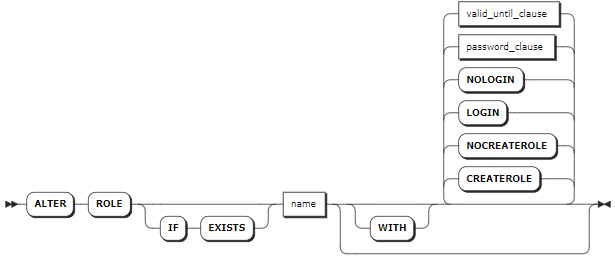
The ALTER ROLE statement changes one or more options for a role. Each statement changes only one role.
Privileges
The user must have the CREATEROLE option or be a member of the admin role. By default, the root user belongs to the admin role.
Syntax
password_clausevalid_until_clause
Parameters
| Parameter | Description |
|---|---|
IF EXISTS | Optional. - When the IF EXISTS keyword is used, the system changes a role only if the target role has already existed. Otherwise, the system fails to change the role without returning an error. - When the IF EXISTS keyword is not used, the system changes a role only if the target role has already existed. Otherwise, the system fails to change the role and returns an error. |
name | The name of the role to change. The role name is case-insensitive and follows these rules: - Start with a letter or an underscore ( _). - Contain letters, numbers, or underscore ( _). - Must be 1 - 63 characters in length. |
CREATEROLE | Allow the role to create, change, and drop other non-admin roles. By default, do not set this option when creating a role. |
NOCREATEROLE | Disallow the role to create, change, and drop other non-admin roles. By default, this option is set when creating a role. |
LOGIN | Allow the role to log in to the KWDB server. By default, this option is set when creating a role. |
NOLOGIN | Disallow the role to log in to the KWDB server. By default, do not set this option when creating a role. |
PASSWORD <password> | Set the password for the role. The password can also be set to NULL. The role with this option can access to a secure cluster with the password. The password should be entered as a string literal, enclosed in single quotes (' '). By default, do not set this option when creating a role. |
VALID UNTIL <date_time> | Set the date and time (in the timestamp format) after which the password is not valid. It can also be set to NULL. It is enclosed in single quotes (' '). When you log in to the KWDB database through a CLI tool, you can check the expiration time of the password. By default, do not set this option when creating a role. |
Examples
Set a role with the
CREATEROLEoption.-- 1. Check role options. SHOW ROLES; username | options | member_of -----------+------------------------------------------------+------------ admin | CREATEROLE | {} role1 | NOLOGIN | {} role2 | CREATEROLE, NOLOGIN | {} role3 | | {} role4 | NOLOGIN, VALID UNTIL=2024-01-01 00:00:00+00:00 | {} root | CREATEROLE | {admin} (6 rows) -- 2. Set role1 with the CREATEROLE option. ALTER ROLE role1 WITH CREATEROLE; ALTER ROLE -- 3. Check role options. SHOW ROLES; username | options | member_of -----------+------------------------------------------------+------------ admin | CREATEROLE | {} role1 | CREATEROLE, NOLOGIN | {} role2 | CREATEROLE, NOLOGIN | {} role3 | | {} role4 | NOLOGIN, VALID UNTIL=2024-01-01 00:00:00+00:00 | {} root | CREATEROLE | {admin} (6 rows)Modify the password and expiration time for a role.
-- 1. Modify the password and expiration time for role4.

ALTER ROLE role4 WITH PASSWORD 'pas2doc' VALID UNTIL '2025-12-31';
ALTER ROLE

-- 2. Check role options.

SHOW ROLES;
  username |                    options                     | member_of
-----------+------------------------------------------------+------------
  admin    | CREATEROLE                                     | {}
  role1    | CREATEROLE, NOLOGIN                            | {}
  role2    | CREATEROLE, NOLOGIN                            | {}
  role3    |                                                | {}
  role4    | NOLOGIN, VALID UNTIL=2025-12-31 00:00:00+00:00 | {}
  root     | CREATEROLE                                     | {admin}
(6 rows)
GRANT
The GRANT statement grants membership to an existing role and the role member inherites all privileges of that role. To grant membership to an admin role, the user must be an admin role with the WITH ADMIN OPTION option.
Note
If the privileges of a role are not updated on time, you can remove the role and then create a new role with a different name and re-grant privileges to the new role.
Privileges
The user must be the admin of the role or a member of the admin role. By default, the root user belongs to the admin role.
Syntax

Parameters
| Parameter | Description |
|---|---|
role_name | A comma-separated list of role names. |
user_name | A comma-separated list of role members to grant. The role member can be a user or a role. |
WITH ADMIN OPTION | Designate the role member as a role admin. Role admins can grant or revoke membership for the specified role. Role members with the admin option can grant or revoke membership for the specified role. |
Examples
Grant membership to a role. By default, the newly-granted member does not have the
adminprivilege.-- 1. Grant memebership role1. GRANT role1 TO user1; GRANT -- 2. Show members of role1. SHOW GRANTS ON ROLE role1; role_name | member | is_admin ------------+--------+----------- role1 | user1 | false (1 row)Grant a role admin to a role.
-- 1. Grant a role admin to role1.

GRANT role1 TO user1 WITH ADMIN OPTION;
GRANT

-- 2. Show members of role1.

SHOW GRANTS ON ROLE role1;
  role_name | member | is_admin
------------+--------+-----------
  role1     | user1  |   true
(1 row)
REVOKE
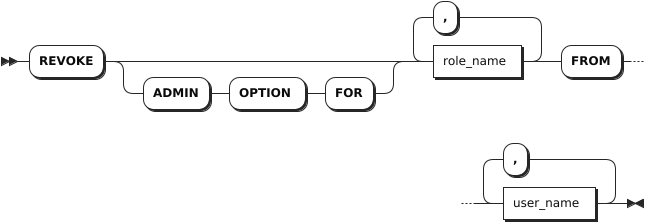
The REVOKE statement revokes membership from an existing role.
Note
The root user cannot be revoked from the admin role.
Privileges
The user must be the admin of the role or a member of the admin role. By default, the root user belongs to the admin role.
Syntax
Parameters
| Parameter | Description |
|---|---|
WITH ADMIN FOR | Optional. When the WITH ADMIN FOR keyword is used, the system revokes the role admin privilege from the role member but keeps its membership. Otherwise, the system revokes the membership from the role. |
role_name | A comma-separated list of role names. |
user_name | A comma-separated list of role members to revoke. The role member can be a user or a role. |
Examples
Revoke the role admin privilege from the role member but keeps its membership.
-- 1. Show members of role1.

SHOW GRANTS ON ROLE role1;
role_name|member|is_admin
---------+------+--------
role1    |role2 |false
role1    |user1 |true
(2 rows)

-- 2. Revoke the role admin privilege from the user1 member but keeps its membership.

REVOKE ADMIN OPTION FOR role1 FROM user1;
REVOKE

-- 3. Show members of role1.

SHOW GRANTS ON ROLE role1;
role_name|member|is_admin
---------+------+--------
role1    |role2 |false
role1    |user1 |false
(2 rows)
Revoke membership from a role.
-- 1. Show members of role1.

SHOW GRANTS ON ROLE role1;
role_name|member|is_admin
---------+------+--------
role1    |role2 |false
role1    |user1 |false
(2 rows)

-- 2. Revoke user1 member from role1.

REVOKE role1 FROM user1;
REVOKE

-- 3. Show members of role1.

SHOW GRANTS ON ROLE role1;
role_name|member|is_admin
---------+------+--------
role1    |role2 |false
(1 row)
DROP ROLE
The DROP ROLE statement removes one or more roles.
Privileges
The user must have the CREATEROLE option or be a member of the admin role. By default, the root user belongs to the admin role.
Syntax

Parameters
| Parameter | Description |
|---|---|
IF EXISTS | Optional. - When the IF EXISTS keyword is used, the system removes a role only if the target role has already existed. Otherwise, the system fails to remove the role without returning an error. - When the IF EXISTS keyword is not used, the system removes a role only if the target role has already existed. Otherwise, the system fails to remove the role and returns an error. |
name | A comma-separated list of role names to remove. |
Examples
This example removes a role named role1.
DROP ROLE role1;