Constraints
ADD CONSTRAINT
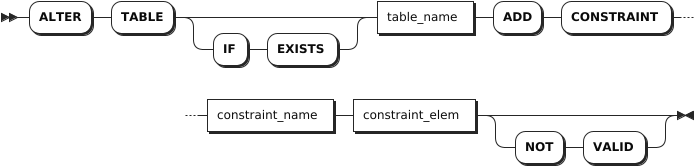
The ALTER TABLE ... ADD CONSTRAINT statement adds the following constraints to columns:
- UNIQUE
- CHECK
- FOREIGN KEY
Note
- You can use the
ALTER TABLE ... ADD COLUMNstatement to add or change default constraints. - KWDB does not supports using the
ALTER TABLE ... ADD CONSTRAINTto add a primary key constraint. To add a primary key constraint to a table, you should explicitly define the primary key at table creation.
Privileges
The user must be a member of the admin role or have been granted the CREATE privilege on the specified table(s). By default, the root user belongs to the admin role.
Syntax
Parameters
| Parameter | Description |
|---|---|
IF EXISTS | Optional. - When the IF EXISTS keyword is used, the system adds a constraint only if the target table has already existed. Otherwise, the system fails to add the constraint without returning an error. - When the IF EXISTS keyword is not used, the system adds a constraint only if the target table has already existed. Otherwise, the system fails to add the constraint and returns an error. |
table_name | The table to which a constraint is added. |
constraint_name | The name of the constraint. The constraint name must be unique within the table and must follow these Identifier Rules. |
constraint_elem | The constraint to add. KWDB supports adding the following constraints: - CHECK: specify that values for the column must satisfy the specified conditions or expressions. - UNIQUE: require that all of a column's values be distinct from one another except for NULL values. - FOREIGN KEY: before adding a foreign key constraint to a column, an index must already exist for that column. If not, use the CREATE INDEX statement to create an index in advance, and then add the foreign key constraint. |
NOT VALID | Create unvalidated constraints. When creating an unvalidated constraint, the system does not check whether existing table data satisfies the constraint. The constraint is still enforced when table data is modified. |
Examples
Add the UNIQUE constraint.
ALTER TABLE orders ADD CONSTRAINT id_unique UNIQUE (id);
ALTER TABLE
Add the CHECK constraint.
ALTER TABLE orders ADD CONSTRAINT date_check CHECK (date > '2020-01-01') NOT VALID;
ALTER TABLE
Add the FOREIGN KEY constraint.
The following example assumes that you have created
office_dogsandaddresstables without foreign key constraints.-- 1. Check the created office_dogs table. SHOW CREATE TABLE office_dogs; table_name | create_statement --------------+---------------------------------------------------------------------------------------------------------+ office_dogs | CREATE TABLE office_dogs ( | id INT8 NOT NULL, | last_name STRING NULL, | full_name STRING NULL, | alive STRING NULL, | rides_id UUID NULL, | rides_length interval NULL, | rides_city STRING NULL, | address_id UUID NULL, | CONSTRAINT "primary" PRIMARY KEY (id ASC), | UNIQUE INDEX id_customer_unique (id ASC, full_name ASC), | INDEX office_dogs_rides_id_idx (rides_id ASC), | INDEX office_dogs_rides_length_rides_city_idx (rides_length ASC, rides_city ASC), | FAMILY "primary" (id, last_name, full_name, alive, rides_id, rides_length, rides_city, address_id), | CONSTRAINT alive_check CHECK (alive = 'true') ENABLE | ) (1 row) -- 2. Check the created address table. SHOW CREATE TABLE address; table_name | create_statement -------------+------------------------------------------------+ address | CREATE TABLE address ( | id UUID NOT NULL, | city STRING NOT NULL, | CONSTRAINT "primary" PRIMARY KEY (id ASC), | FAMILY "primary" (id, city) | ) (1 row) -- 3. Create an index on the address_id column for the office_dogs table. CREATE INDEX ON office_dogs (address_id); -- 4. Add a foreign key constrain to the address_id column for the office_dogs table, using ON DELETE CASCADE statement to delete all dependent objects when deleting related rows. ALTER TABLE office_dogs ADD CONSTRAINT address_fk FOREIGN KEY (address_id) REFERENCES address (id) ON DELETE CASCADE; ALTER TABLE -- 5. Show constrains for the office_dogs table. SHOW CONSTRAINTS FROM office_dogs; table_name | CONSTRAINT_name | CONSTRAINT_type | details | validated --------------+--------------------+-----------------+--------------------------------------------------------------------+-----------+ office_dogs | address_fk | FOREIGN KEY | FOREIGN KEY (address_id) REFERENCES address (id) ON DELETE CASCADE | false office_dogs | alive_check | CHECK | CHECK (alive = 'true') ENABLE | true office_dogs | id_customer_unique | UNIQUE | UNIQUE (id ASC, full_name ASC) | true office_dogs | primary | PRIMARY KEY | PRIMARY KEY (id ASC) | true (4 rows)
SHOW CONSTRAINTS
The SHOW CONSTRAINTS statement lists all named constraints as well as any unnamed UNIQUE constraints on a table.
Privileges
The user must have any privilege on the specified table(s).
Syntax

Parameters
| Parameter | Description |
|---|---|
table_name | The name of the table for which to show constraints. |
Responses
| Field | Description |
|---|---|
table_name | The name of the table. |
constraint_name | The name of the constraint. |
constraint_type | The type of the constraint. |
details | The definition of the constraint, including the column(s) to which it applies. |
validated | Whether values in the column(s) match the constraint. |
Examples
This example shows details about constraints on the orders table.
SHOW CONSTRAINTS FROM orders;
If you succeed, you should see an output similar to the following:
  table_name |    constraint_name     | constraint_type |                                               details                                                | validated
-------------+------------------------+-----------------+------------------------------------------------------------------------------------------------------+------------
  orders     | check_priority         | CHECK           | CHECK ((priority BETWEEN 1 AND 5))                                                                   |   true
  orders     | check_status           | CHECK           | CHECK ((status IN ('open':::STRING, 'in progress':::STRING, 'done':::STRING, 'cancelled':::STRING))) |   true
  orders     | date_check             | CHECK           | CHECK ((date > '2020-01-01'))                                                                        |   false
  orders     | id_unique              | UNIQUE          | UNIQUE (id ASC)                                                                                      |   true
  orders     | orders_customer_id_key | UNIQUE          | UNIQUE (customer_id ASC)                                                                             |   true
  orders     | primary                | PRIMARY KEY     | PRIMARY KEY (id ASC)                                                                                 |   true
(6 rows)
RENAME CONSTRAINT
The ALTER TABLE ... RENAME CONSTRAINT statement changes the name of a constraint on a column.
Privileges
The user must be a member of the admin role or have been granted the CREATE privilege on the specified table(s). By default, the root user belongs to the admin role.
Syntax

Parameters
| Parameter | Description |
|---|---|
IF EXISTS | Optional. - When the IF EXISTS keyword is used, the system renames a constraint only if the target table has already existed. Otherwise, the system fails to rename the constraint without returning an error. - When the IF EXISTS keyword is not used, the system renames a constraint only if the target table has already existed. Otherwise, the system fails to rename the constraint and returns an error. |
table_name | The name of the table for which to rename constraints. |
current_name | The current name of the constraint. The constraint name must be unique within the table and must follow these Identifier Rules. |
name | The new name of the constraint. The constraint name must be unique within the table and must follow these Identifier Rules. |
Examples
This example renames the orders_customer_id_key constraint on the orders table to orders_customer_id_key_rename.
-- 1. Renames the orders_customer_id_key constraint on the orders table to orders_customer_id_key_rename.

ALTER TABLE orders RENAME CONSTRAINT orders_customer_id_key TO orders_customer_id_key_rename;
ALTER TABLE

-- 2. Show constraints on the orders table.

SHOW CONSTRAINTS FROM orders;
  table_name |        constraint_name        | constraint_type |                                               details                                                | validated
-------------+-------------------------------+-----------------+------------------------------------------------------------------------------------------------------+------------
  orders     | check_priority                | CHECK           | CHECK ((priority BETWEEN 1 AND 5))                                                                   |   true
  orders     | check_status                  | CHECK           | CHECK ((status IN ('open':::STRING, 'in progress':::STRING, 'done':::STRING, 'cancelled':::STRING))) |   true
  orders     | date_check                    | CHECK           | CHECK ((date > '2020-01-01'))                                                                        |   false
  orders     | id_unique                     | UNIQUE          | UNIQUE (id ASC)                                                                                      |   true
  orders     | orders_customer_id_key_rename | UNIQUE          | UNIQUE (customer_id ASC)                                                                             |   true
  orders     | primary                       | PRIMARY KEY     | PRIMARY KEY (id ASC)                                                                                 |   true
(6 rows)
DROP CONSTRAINT
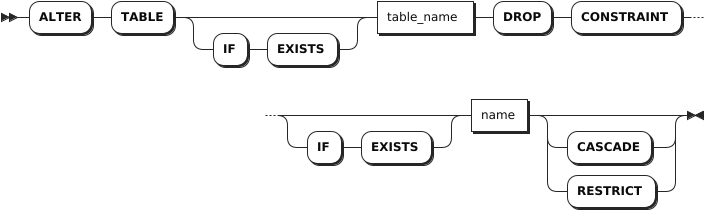
The ALTER TABLE ... DROP CONSTRAINT statement removes CHECK and FOREIGN KEY constraints from columns.
Privileges
The user must be a member of the admin role or have been granted the CREATE privilege on the specified table(s). By default, the root user belongs to the admin role.
Syntax
Parameters
| Parameter | Description |
|---|---|
IF EXISTS | Optional. - When the IF EXISTS keyword is used, the system removes the constraint only if the target constraint has already existed. Otherwise, the system fails to remove the constraint without returning an error. - When the IF EXISTS keyword is not used, the system removes the constraint only if the target constraint has already existed. Otherwise, the system fails to remove the constraint and returns an error. |
table_name | The name of the table from which the constraint to remove. |
name | The name of the constraint to remove. |
CASCADE | Optional. Remove the target constraint and its dependent objects. The CASCADE keyword does not list objects it removes, so it should be used cautiously. |
RESTRICT | (Default) Optional. Do not remove the constraint if any objects depend on it. |
Examples
This example removes the check_status constraint from the orders table.
-- 1. Show constrains for the orders table.

SHOW CONSTRAINTS FROM orders;
  table_name |        constraint_name        | constraint_type |                                               details                                                | validated
-------------+-------------------------------+-----------------+------------------------------------------------------------------------------------------------------+------------
  orders     | check_priority                | CHECK           | CHECK ((priority BETWEEN 1 AND 5))                                                                   |   true
  orders     | check_status                  | CHECK           | CHECK ((status IN ('open':::STRING, 'in progress':::STRING, 'done':::STRING, 'cancelled':::STRING))) |   true
  orders     | date_check                    | CHECK           | CHECK ((date > '2020-01-01'))                                                                        |   false
  orders     | orders_customer_id_key_rename | UNIQUE          | UNIQUE (customer_id ASC)                                                                             |   true
  orders     | primary                       | PRIMARY KEY     | PRIMARY KEY (id ASC)                                                                                 |   true
(5 rows)

-- 2. Remove the check_status constraint from the orders table.

ALTER TABLE orders DROP CONSTRAINT check_status;
ALTER TABLE

-- 3. Show constrains for the orders table.

SHOW CONSTRAINTS FROM orders;
  table_name |        constraint_name        | constraint_type |              details               | validated
-------------+-------------------------------+-----------------+------------------------------------+------------
  orders     | check_priority                | CHECK           | CHECK ((priority BETWEEN 1 AND 5)) |   true
  orders     | date_check                    | CHECK           | CHECK ((date > '2020-01-01'))      |   false
  orders     | orders_customer_id_key_rename | UNIQUE          | UNIQUE (customer_id ASC)           |   true
  orders     | primary                       | PRIMARY KEY     | PRIMARY KEY (id ASC)               |   true
(4 rows)